
Work schedules and working time for businesses with two to ten stores or venues.

Every store in one plan, and you see who worked how many hours during the month.

Proplanum builds the schedules of all your stores in one place, and the team sees them on their phones. Worked hours sit next to the plan before your accountant counts them. Leave and swaps go through the app, and hours go to the software you use for payroll as an export file. None of this needs till data.

On the call we compare hours and labour cost in your stores.

The owner of several stores talks to a store manager in an apron, a second store across the street behind the window

Diagram: plan and actual, store by store, during the month.

21 days, no card with account manager schedules from Start, stores side by side from Premium From $3.50 per employeePricing

Plan next to actual and summaries with the amount to pay are in the Biznes plan. Premium adds all stores in one view. How implementation works

With a few stores, nothing is planned around footfall.

  1. 1

    “I find out who worked how many hours from the payroll, when nothing can be changed any more.”

  2. 2

    “My store manager has been with me for fifteen years and has it all in her head. Which means I only have it in her head.”

  3. 3

    “To know what is going on in the stores, I call every manager.”

This is the problem owners of several stores usually come with.

With a few stores we do not plan anything around footfall. The point is to have the plan and worked hours side by side before your accountant counts them. Till data is not needed for this. If you have it one day, demand-based staffing is a next step, not a condition for starting (from Premium).

“We have one or two people on a shift.”

Then the software gives you something different. You keep a published schedule, swaps, requests and actual hours, not demand-based staffing.

For one venue
“We already have payroll software.”

It stays. It settles hours after the month closes. We show them in the week they happen and hand it the result as an export file. We compare ourselves with the software you have, not with a spreadsheet.

Payroll integrations

First plan next to actual, then a ready schedule, and finally stores side by side.

Plan and worked hours side by side before your accountant counts them. fromBiznes

  • You build the schedules of all stores in one place. An employee has a main store and additional ones, so they can get a shift in another store. Labour Code rules count all their shifts together when they work under one contract. from Start
  • The team tracks time on the phone or at a kiosk on a tablet. Worked hours sit next to the plan during the month, and corrections keep their history. from Biznes
  • Swaps and leave go through the app. An employee proposes a swap or gives up a shift, a colleague takes it, and the store manager approves with one tap. Whoever covers for her sees the same as she does. from Start
  • Hours, absences and overtime go out in one summary to the software you use for payroll, also when an accounting firm runs it. An electronic sick note (e-ZLA) from ZUS, the Polish social insurance institution, removes that person from their shifts by itself, and the manager gets a notification.

Time tracking works automatically. from Biznes

A clock-in on the phone or at the kiosk appears next to the plan straight away. Entries that match the plan can approve themselves if you switch this on for the location. The store manager checks only lateness and other differences. Overtime follows from the working time standard and the schedule, and the night work premium is counted for every hour within the night hours set for your company.

Hours go to nine HR and payroll systems used in Poland, with import instructions, and to ADP in both directions. Sick notes come in from ZUS (e-ZLA). Full list of systems

We do not replace the software you use for payroll. It settles hours after the month closes; we show hours in the week they happen and hand it the result.
Time tracking and kioskLeave requests and swaps

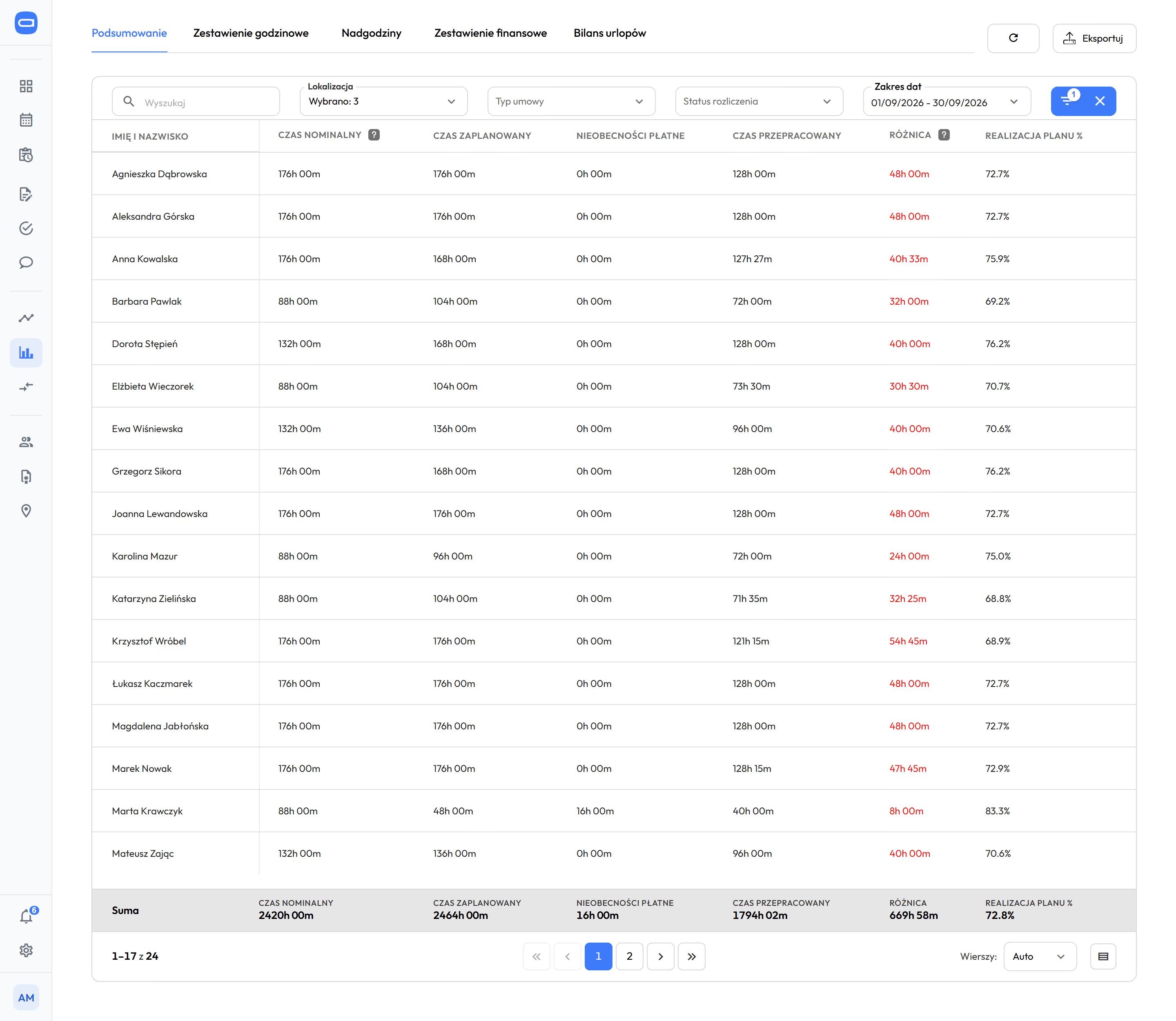
Summaries in Proplanum, the Overview tab for three locations for September 2026: for each person the required, planned, paid absence and worked hours, the difference and plan completion, next to the tabs Hours summary, Overtime, Financial summary and Leave balance, and an Export button
Monthly summary for three locations: plan next to worked hours, ready to export. Demo data. The app is available in English.

The software builds a ready schedule from staffing rules. The manager edits and approves. automatic from Premium

It does not replace the person who runs the store. It takes the scheduling off them.

  1. 1

    You save your staffing rules once: how many people on a shift, who works in which position, availability, contracts and FTEs.

  2. 2

    The software builds a ready schedule for a week or a month.

  3. 3

    The person running the store edits it by hand and publishes it, and the team gets a notification.

What one person has carried in their head for fifteen years stays written down in the company. A new manager steps into something ready.

You copy staffing rules set in one store to the next ones.

Scheduling, period templates and copying periods are in the plan from Start. Automatic scheduling from your staffing rules, including demand-based scheduling with a forecast, is from Premium.

Automatic scheduling in several modes. from Premium

You choose the mode each time you build a schedule. The software builds from weekly templates or from unassigned shifts. It builds from demand once you have till data. The manager sets what matters most, for example people's availability, cost or an equal spread of hours. The software checks rest periods and hour limits while it builds. Nothing reaches the team until the manager approves it.

How the schedule is builtAutomatic scheduling step by step

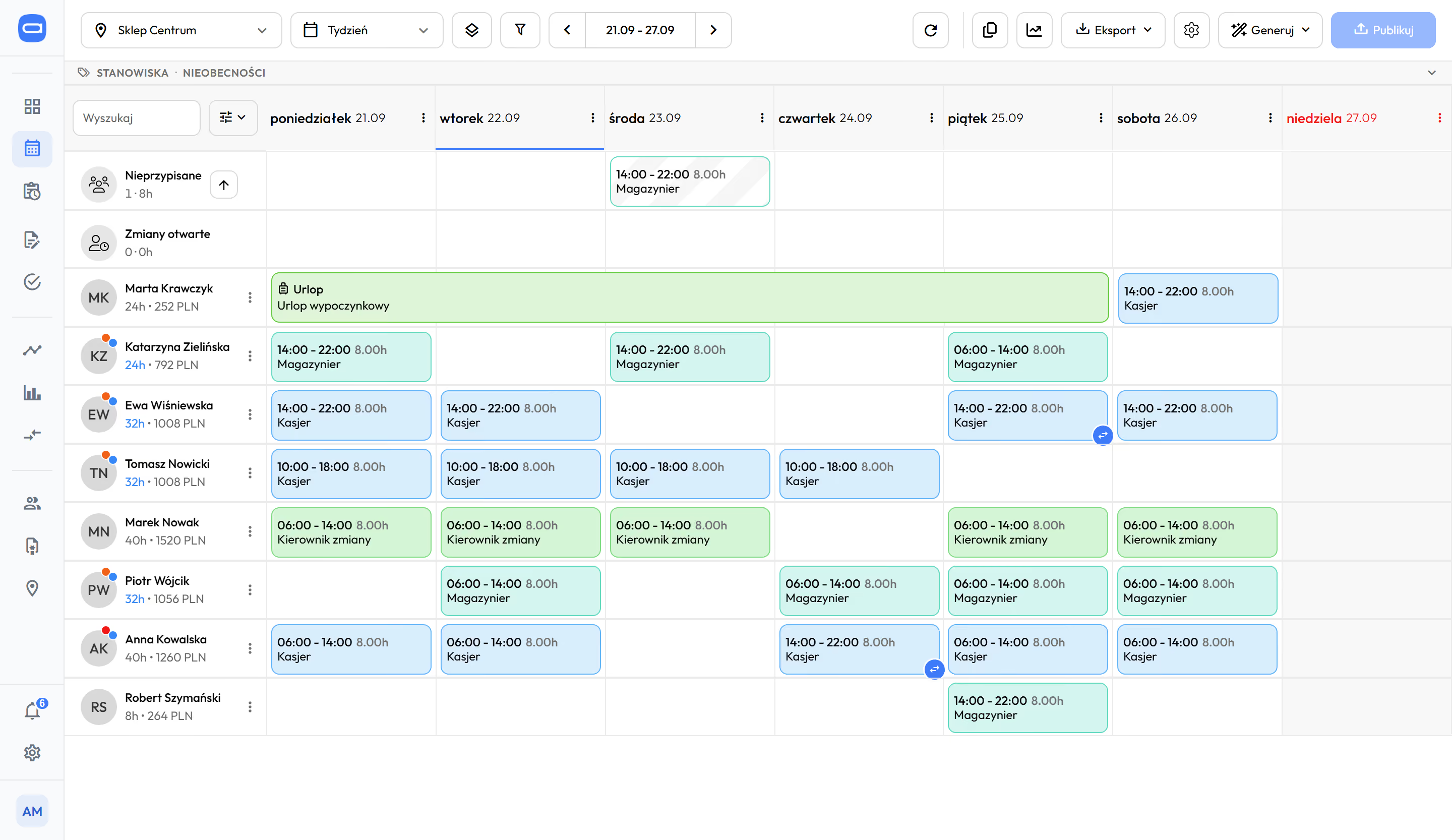
A store's weekly schedule in Proplanum: eight people and seven days with shifts, leave as a band across the whole week and one shift in the Unassigned row
A store's weekly schedule: shifts, leave and a shift in the Unassigned row. Demo data. The app is available in English.

Stores side by side: hours, overtime and cost per hour in one view. fromPremium

  • Stores in rows, and for each one planned and actual hours, overtime, cost per hour and a comparison of two periods.
  • The talk with a manager is about numbers, not impressions. You see which store and which day drives the cost.
  • The regional manager and head office see the same numbers, without a tour of the stores and without a month-end report.
  • The view starts in the Premium plan, a level above the schedule and the records. Pricing
Location comparison and reports
One day in three stores
Comparing stores: one day, each separately or in one view. Drawing, not a screenshot.

The owner, the regional manager and the store manager work from the same hours.

A cashier in a green apron scans shopping at a grocery till, a customer with a basket
A waitress with a tray between busy tables in a full, bright restaurant
A store manager checks a tablet in an aisle, two employees stock the shelves
Owner

Sees all stores during the month, without driving round and without calling.

  • plan next to actual, store by store
  • overtime before it reaches the payroll
  • staffing rules kept in the company, not in one head
Location comparison and reports
Regional manager

Has the same numbers as head office, on the road and in talks with the store manager.

  • the region's stores in one view
  • which store stands out and on which day
  • schedules and requests of all stores without asking
Work schedule
Store manager

Stops being the phone switchboard and still decides on the schedule.

  • a ready version of the schedule to edit (from Premium)
  • swaps and leave to approve on the phone
  • whoever covers for her sees the same as she does
What your team will see

The team gets the app: the schedule on the phone, leave requests and swaps without calling the store manager.

Plan next to actual is in the Biznes plan. Premium adds stores side by side.

Three levels; each higher one includes the one before.

Start

from $3.50

  • schedules of all stores in one place
  • Labour Code checks in the schedule
  • leave requests, swaps and open shifts
  • payroll export for the software you use
plan next to actual is here

Biznes

from $4

  • time tracking on the phone and kiosk
  • working time records with approval of hours
  • plan next to actual and summaries with the amount to pay
  • tasks for a shift

Premium

from $4.50

  • automatic scheduling from your staffing rules
  • stores side by side in one view
  • demand-based staffing, once you have till data
  • team chat

Enterprise: A dozen or more stores, integrations with your other systems and API, SLA and a dedicated account manager. Custom quote after a call.Book a 30-minute call

Prices per employee, billed annually. Prices in US dollars (USD), excluding VAT. Every account counts as one licence: employee, manager, administrator. The employee file is an add-on to every plan and costs $0.50 a month per employee. Once enabled, it covers all employees of the company.

Compare plans

We measure results over a quarter, and you can start with one store.

  • about 9%lower labour cost with service maintained, over one quarter.Retail chain.
  • about a quarter less overtime, within one quarter.Retail chain.
  • from a few to several hundred locations is the range of our implementations. The rules and exports are the same with five stores.
  • start with one store you set the staffing rules once and extend them to more stores when they are ready.
A store manager shows a young sales assistant an empty weekly grid on a board in a bright back room with crates of vegetables

Questions people ask before a call about several stores.

Your payroll software stays. It settles hours after the month closes, store by store. We show the plan next to worked hours during the month, in all stores at once, and hand it the result. You replace nothing; you add a step you do not have today.

Yes. Scheduling, swaps, requests, actual hours and stores side by side do not need sales data. Demand-based staffing is an option from the Premium plan for those who have such data.

It builds a ready schedule from your staffing rules. The manager edits and approves it, and nothing is published without them. In the Start plan you build the schedule by hand, from period templates and by copying. Automatic scheduling is from Premium.

The software does not replace the store manager; it takes the scheduling off her. Her rules are saved, the software prepares a version, and she edits and publishes it. With swaps and leave she stops being the phone switchboard. The decision stays with her.

Yes. An employee has a main store and additional stores, so they can get a shift in any of them. Labour Code rules count all their shifts together when they work under one contract.

Yes. You set the staffing rules in one store and extend them to more stores when they are ready. A 21-day trial, or a pilot in one store alongside the software you have; you switch over when you decide.

Start costs $4 per employee per month excluding VAT, Biznes $4.50 and Premium $5. Billed annually: $3.50, $4 and $4.50. Every account counts as one licence: employee, manager and administrator. You change the number of accounts each month: up at any time, down from the next month. You can work out the amount for your team in the calculator on the pricing page.

With several stores, a few weeks. On your side: the store structure, the list of employees and the staffing rules. A remote start with an account manager and online training is included in the plan price. On-site days with your account manager, on-site training and integrations are quoted separately, with the price agreed before the start.

With a self-service start, data transfer is part of the implementation included in the price. Import from several systems is quoted together with implementation. We have tools to make it quick and keep work running. You choose the date.

The call takes 30 minutes and ends with your hours compared with labour cost.

  1. How many stores and how many people.You tell us how you build schedules today.
  2. What happens to hours between the schedule and the payroll.We check where time gets lost.
  3. What implementation means on your side.Scope, time and who is needed.

A remote start with an account manager and online training is included in the plan price. On-site days with your account manager, on-site training and integrations are quoted separately, with the price agreed before the start. With a dozen or more stores, this is usually the case. With a self-service start, data transfer is part of the implementation included in the price. Import from several systems is quoted together with implementation. You choose the date.

Prefer to check for yourself? Start a 21-day trial, no card

Book a 30-minute call.

kilka
Enter the name of the person we should speak to.
Enter the email address we should reply to.
Enter the number we should call you back on.
Choose a range so we can pick an example of a similar size.

On the call we compare hours and labour cost in your stores.

Monday to Friday, 8:00 to 16:00, Central European Time (CET), we reply the same day. After 16:00 and at weekends, we reply by 12:00 on the next working day.

By sending the form, you agree that we may contact you about the call. Privacy Policy.

Thank you, we have your details.

We will call you back on the number you gave. Monday to Friday, 8:00 to 16:00, Central European Time (CET), we reply the same day. After 16:00 and at weekends, we reply by 12:00 on the next working day.

The form could not be sent. Please try again or call us on +48 503 700 111.

+48 503 700 111info@proplanum.com

Already using the app? Log in or visit the help centre in English.