
Multi-location chain: from a dozen to several hundred stores, venues or other locations.
The hours behind your labour cost, visible location by location before they reach the payroll.
Proplanum is workforce management software for staff scheduling and time and attendance. You see labour cost as a percentage of sales, location by location and month by month. Whether staffing matches footfall hour by hour only shows later, in conversion figures. Proplanum puts staffing next to footfall from the same hour, in all locations at once. From this it builds the work schedule before the month starts and hands the result to the system you already have.
On the call we compare staffing and footfall on your numbers.
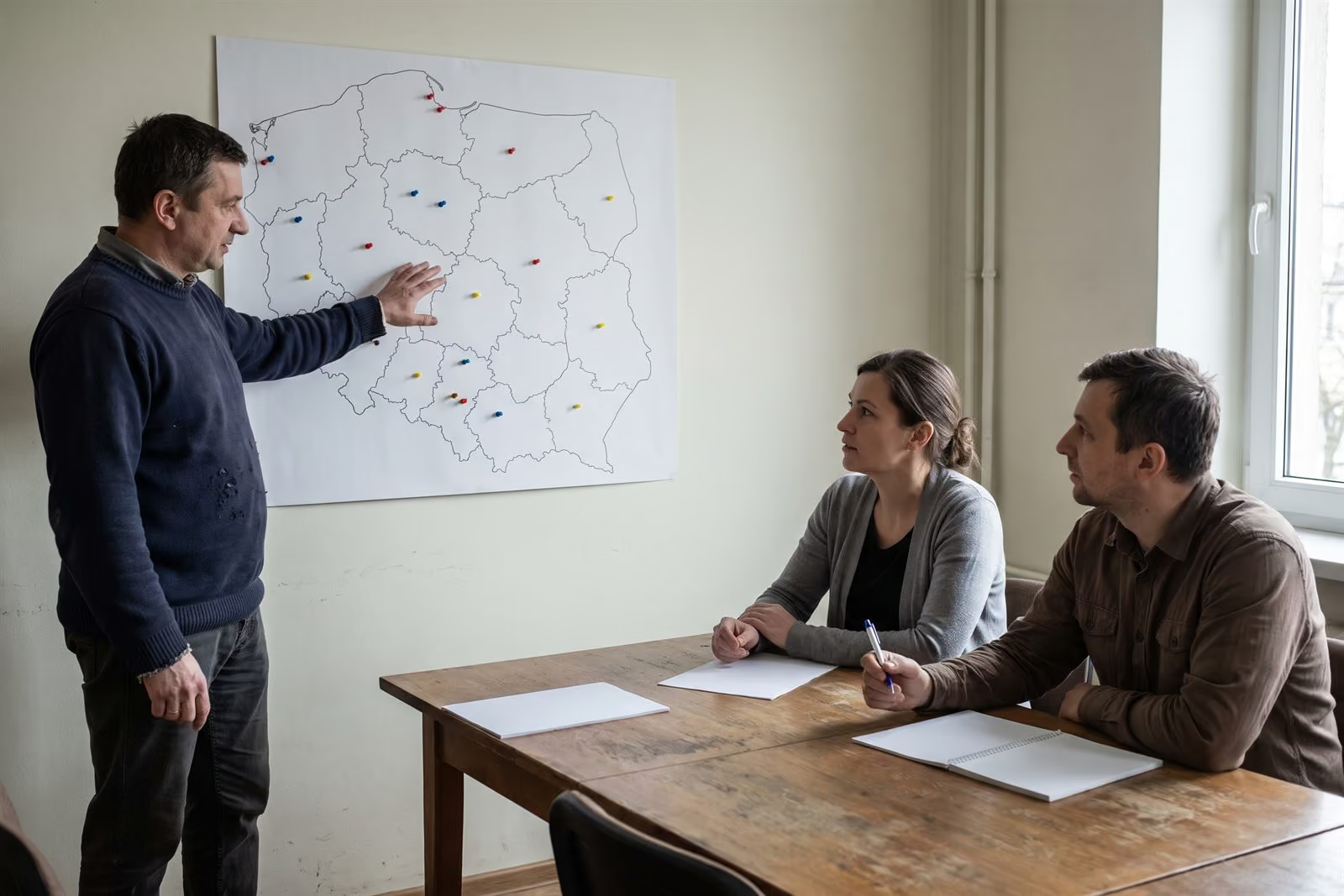
Diagram of a chain with a pilot region. The drawing scrolls sideways.
two in three
In stores measured before implementation, only two in three paid hours fell when customers were in the store.
Retail chains with till data; share of hours with staffing equal to demand, measured before implementation.
- 1
“In the budget, labour cost is a percentage of sales. The hours inside it are invisible.”
- 2
“We have a staffing standard and the regions follow it. Whether someone is on the till at 18:00, I see from conversion a month later.”
- 3
“Regional managers report what they want to report. I want to see the same as they do, without waiting for the report.”
This is the problem chains usually come with.
This page is for chains with a head office, regions and a payroll system. For a few stores without regions there is a separate path. Several locations
Plan next to actual, overtime and cost per hour, location by location, during the month. location comparison from Premiumactual hours from Biznes
Today the plan and actual hours live in two places. Differences and overtime come out of the payroll a month later. Here they sit side by side in the week they happen, without asking the managers.
- Three levels: sectors, regions, locations. A regional director sees the same for their region and has material to pass upwards.
- Planned hours next to worked hours, and plan completion.
- Absences and overtime at 50% and 100%.
- Planned cost, actual cost and cost per hour.
- Nights, Sundays and public holidays shown separately.
- Comparison of periods and export to a file.
The manager corrects staffing during the month, not after payroll. A location that stands out is visible within the week. The talk with a region is about numbers, not about versions of a report.
Two locations with similar turnover, a different cost per hour. In the monthly report they look the same. Here you see which one, and on which days.
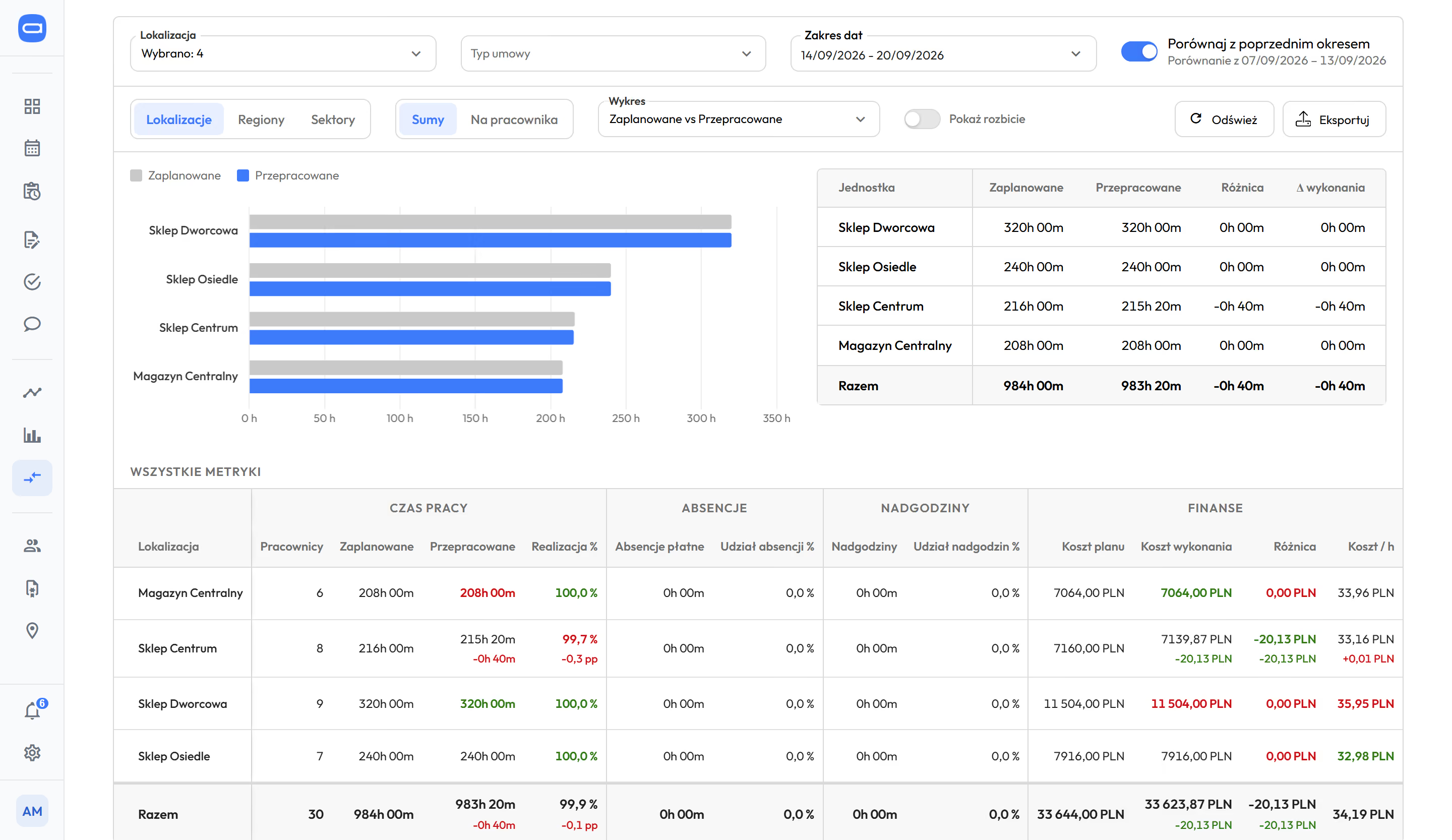
Many locations in one place: sectors, regions, locations. An employee has a main location and additional ones, so they can get a shift in another location, and Labour Code rules count all their shifts together when they work under one contract.
These numbers do not need till data. Footfall data is needed only for demand-based staffing, two chapters below.
You have an HR and payroll system, probably time tracking too. They stay. Proplanum works earlier.
Most chains have a payroll system, and some have time tracking. Both count after the fact, after the month, location by location. We replace neither. We add a step you do not have today: before the fact and during the month.
Proplanum plans staffing and tracks working time. It works alongside the HR and payroll system you already have.
- Before the fact
The schedule comes from the same staffing rules across the chain.
Where there is footfall data, also around footfall.
- During the month
Actual hours next to the plan in every location.
You see overtime before it happens.
- After the fact
The result goes to the system you have.
Payroll without retyping.
In the HR and payroll system the month ends with the payroll. Here the next schedule starts from it. The forecast for next week is calculated from the footfall that has just passed (from Premium). Plan next to actual shows where the schedule drifted from reality before you build the next one (from Biznes). Absences, availability and the overtime balance are visible when you build the next schedule (from Start), and automatic scheduling takes absences and availability into account by itself (from Premium).
- Your HR and payroll system stays. Hours, absences and overtime go to nine HR and payroll systems used in Poland, with import instructions: Comarch Optima, R2Płatnik, enova365, Symfonia, Gratyfikant GT, Gratyfikant nexo, Wapro Gang, SAP, DATEV LODAS. Plus ADP in both directions, and electronic sick notes (e-ZLA) from ZUS, the Polish social insurance institution. A system imposed by your group, or a contract with another supplier? The regional pilot runs alongside it, with nothing cancelled.
- Time tracking, if you have it. In the pilot we agree whether clock-ins stay there or the team tracks time in Proplanum: in the app, at a kiosk on a tablet or in the browser. Before the start we check whether the history of clock-ins can be moved from another supplier's reader.
- Footfall data. Sales and footfall come in automatically from your till, POS or hotel system. Till data comes in by file or through an integration built for your systems as part of implementation.
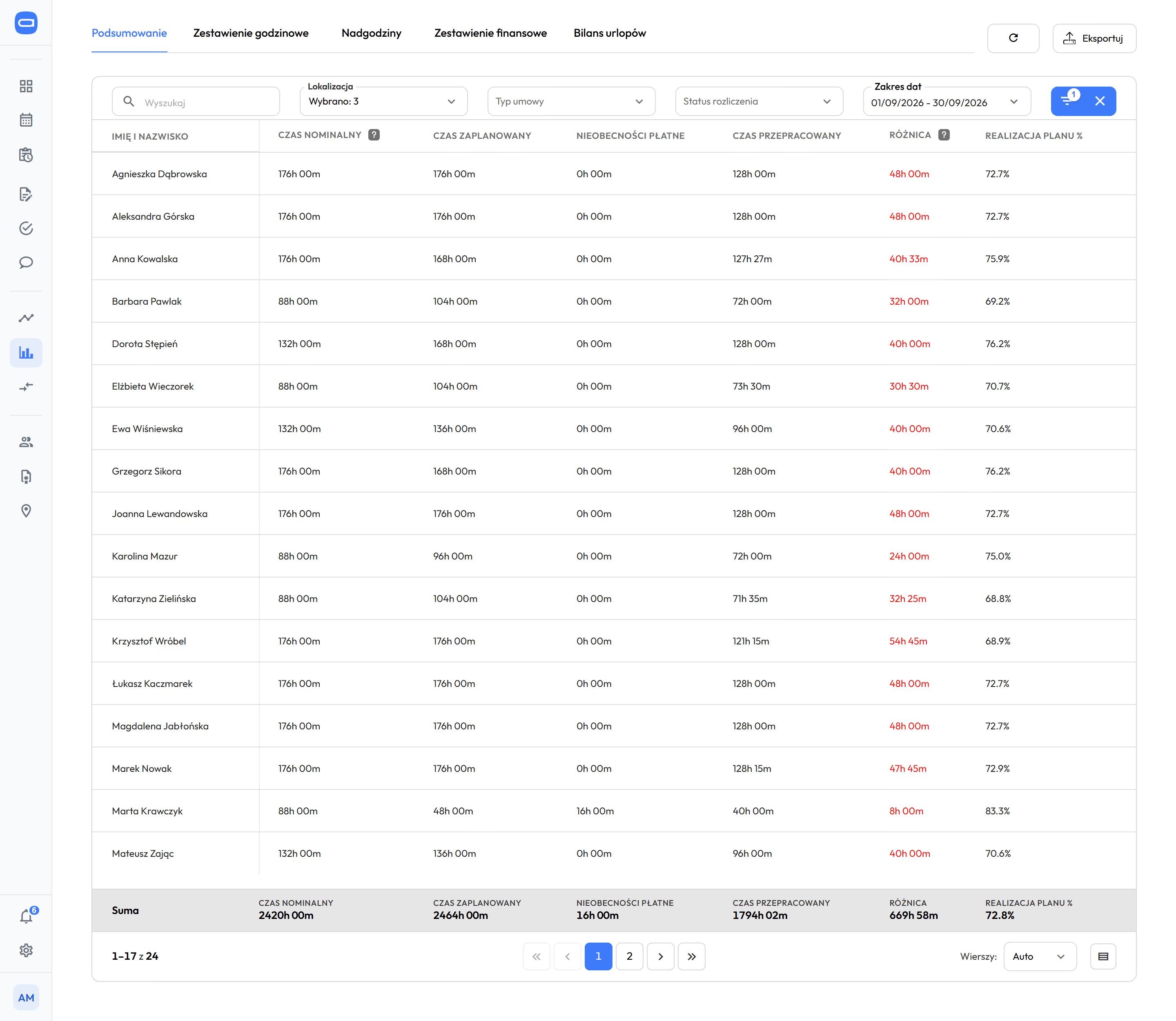
We prepare settings and integrations for your processes as part of implementation. Enterprise adds integrations with your other systems and API.
With a self-service start, data transfer is part of the implementation included in the price. Import from several systems is quoted together with implementation.
Your chain has a staffing standard. The software builds the schedule from it and matches it to footfall, hour by hour. schedule from Startautomatic and demand-based from Premium
Every chain has a staffing standard. The question is on what time scale it meets footfall: in a monthly report or in next week's schedule.
- 1
Staffing rules saved once. You set exceptions for each location and position. You copy rules set in one location to the next ones, including a newly opened one.
- 2
Footfall comes in by itself. Sales and footfall arrive automatically from the till, POS or hotel system. The forecast is built from footfall history, with the trend and a year-on-year comparison, and measures its own error.
- 3
The software prepares a ready schedule for that footfall, within FTEs and the Labour Code. The manager edits and approves it. Nothing reaches the team without them.
It does not replace the manager; it takes the scheduling off them. The rules they carry in their head stay written down in the company.
Rest periods, hour limits and the employee's working day (the 24 hours counted from the start of the shift) are checked while the schedule is built, before it reaches the team. In every plan.
Automatic scheduling in every location. from Premium
You choose the mode each time you build a schedule. The software builds from templates, from unassigned shifts or from demand. In warehouses and distribution centres, also by crew rotation. The manager sets what matters most, for example people's availability, cost or an equal spread of hours. Nothing reaches the team until the manager approves it.
Automatic scheduling step by stepHours add up automatically. from Biznes
When the team tracks time in Proplanum, a clock-in appears next to the plan straight away. Entries that match the plan can approve themselves if you switch this on for the location. The manager checks only the differences. Overtime follows from the working time standard and the schedule, and the night work premium is counted for every hour within the night hours set for your company. Without internet access the kiosk accepts PIN and QR code clock-ins and sends them later.
Time tracking and kioskWork schedule: how a ready schedule is builtFootfall forecast and demand-based scheduling
Regional pilot: the locations of one region, one quarter, a decision on that region's numbers.
The result of one store in a chain of several dozen locations proves nothing to anyone. A region has what the whole chain has: different formats, different footfall, vacancies and absence. That is why the pilot is a project with a scope, a deadline and criteria, not a trial.
staffing against footfallovertimecost per hourplan next to actual
The main measure is chosen by the role that leads the project: operations, HR or finance. The others are supporting measures.
On your side
A project lead at head office, the region's location managers at training, and a list of employees with contracts and FTEs. Also access to till data, HR for a trial payroll export, and IT only for the integration.
On our side
Configuration, integrations, training, an implementation manager who leads from the first day to the decision, and a review after each month.
Implementation and its price
For chains, implementation and the training series are paid services, quoted as a separate project. That means days of your implementation manager at your premises, on-site training, an integration built for your systems and data import from many systems. The price is open, not hidden in the licence. You get the amount in the offer before the pilot starts, with licence, implementation and training listed separately. The call and the quote cost nothing. With a self-service start, data transfer is part of the implementation included in the price. Import from several systems is quoted together with implementation.
Implementations from a few to several hundred locations. Proplanum's customer portfolio.
On the call we compare staffing and footfall on your numbers from one region.
We have a contract with another supplier. Can we start at all?
Yes. The regional pilot runs alongside the system you have, without switching it off and without ending the contract. Hours go back to it without retyping. The decision comes after the quarter, on that region's numbers.
Who on our side needs to be involved?
A project lead at head office and the region's location managers at training, for a few hours. HR for a trial payroll export. IT only for the integration with the tills or with the HR and payroll system. We take on configuration, data import, integrations and training.
What happens after the pilot?
A decision on your numbers: more regions with the same staffing rules, one more quarter in the same region, or the end. No commitment for the whole chain. We copy the rules set in the pilot region to the next ones.
We use another system. What does data transfer cost and will it stop our work?
With a self-service start, data transfer is part of the implementation included in the price. Import from several systems is quoted together with implementation. We have tools to make it quick and keep work running. We transfer employees, contracts and FTEs, and the location structure; leave balances on the start date, if they are in your system. We confirm the scope on a call before the import starts. You choose the date.
Where do you get footfall data, and what if we do not have it for all locations?
Sales and footfall come from the till, POS or hotel system: by file or through an integration built for your systems as part of implementation. Where there is no data, plan next to actual, overtime and cost per hour work without it.
What does implementation cost for a chain, and when will we know the amount?
For chains, implementation and the training series are paid services, quoted as a separate project. You get the amount in the offer before the pilot starts, with licence, implementation and training listed separately. The quote depends on the number of locations and regions, the number of employees, the scope of integrations, the training format and the scope of data import. The call and the quote cost nothing.
Results counted in locations, not companies.
- about a quarter less overtime, within one quarter.Retail chain. No till data.
- about 9%lower labour cost with service maintained, over one quarter.Retail chain.
- over 8,000employees at our largest customer.As of September 2026.

To hand on to your team: each role gets its own way in.



Sees staffing against footfall and the region's locations side by side, without touring them.
- staffing next to footfall from the same hour
- comparison of the region's locations during the month
- a pilot in one region for one quarter
Gets the chain's labour cost before the fact and the numbers to pass on.
- labour cost store by store, before and after
- a decision on more regions based on your own numbers
- labour cost on your numbers, on the first call
The purchase needs their approval, so they get their own pages.
For managers and the team: What your team will see
What this means in money for a chain your size: your numbers on the call, not a price list.
On the call we work through your numbers with you. We show what changes in hours, overtime and labour cost, store by store, at a scale matched to your chain.
- Store by store: a table in the layout of a panel export. People, planned hours, absences, overtime, actual hours, labour cost and cost change. The month before go-live next to the third month after.
- One store, one day: till receipts hour by hour and the number of people on shift, before and after. Only where there is till data.
- A chain with a head office also sees sales per hour worked for each store.
This is not a price offer or a software presentation. We give the price next to the number from your data, not instead of it.
A member of our team replies and leads the call, not an automated system. Monday to Friday, 8:00 to 16:00, Central European Time (CET), we reply the same day. After 16:00 and at weekends, we reply by 12:00 on the next working day. There is no file to download on this page.
Book a 30-minute callThe call takes 30 minutes and ends with a first step on your numbers.
- Size and regional structure.You tell us how the chain works: sectors, regions, location formats.
- Staffing against footfall on your numbers.Using one region or a chain similar to yours.
- What the pilot means on your side.Scope, time, who is needed and what implementation costs.
For chains, implementation and the training series are paid services, with the amount in the offer before the start. With a self-service start, data transfer is part of the implementation included in the price. Import from several systems is quoted together with implementation.
comparison and demand-based staffing from Premium your integrations, API and SLA in Enterprise a DPA with every customerPricing
A dozen or more locations? Book a 30-minute call.
Thank you, we have your details.
We will call you back on the number you gave. Monday to Friday, 8:00 to 16:00, Central European Time (CET), we reply the same day. After 16:00 and at weekends, we reply by 12:00 on the next working day.
- First call and scope. Sets the scope and works through your numbers with you.
- Implementation manager. Leads the regional pilot from the first day to the decision, the same person from the start.
- Integrations and API. Connects the HR and payroll system, tills or hotel system and checks the export.
- Support Monday to Friday. After implementation our team answers, plus the help centre in English and in-app chat.
- Microsoft Azure in the EU. Hosting and regular data backups.
- A data processing agreement (DPA) with every customer. SLA in the Enterprise plan.
- Integrations with your other systems and API. In Enterprise.
- Dedicated account manager. In Enterprise.