
Time tracking and kiosk for shift-based businesses: one location or a chain.
Hours worked sit next to the plan before the month closes.
Time tracking in Proplanum works from a phone, a kiosk on a tablet and a browser. Every clock-in sits next to the planned shift. Lateness and early leaving show at once, and hours go to payroll without retyping. There are seven ways to clock in, from a PIN to a card.
- Employee's phone
- Kiosk on a tablet
- Browser
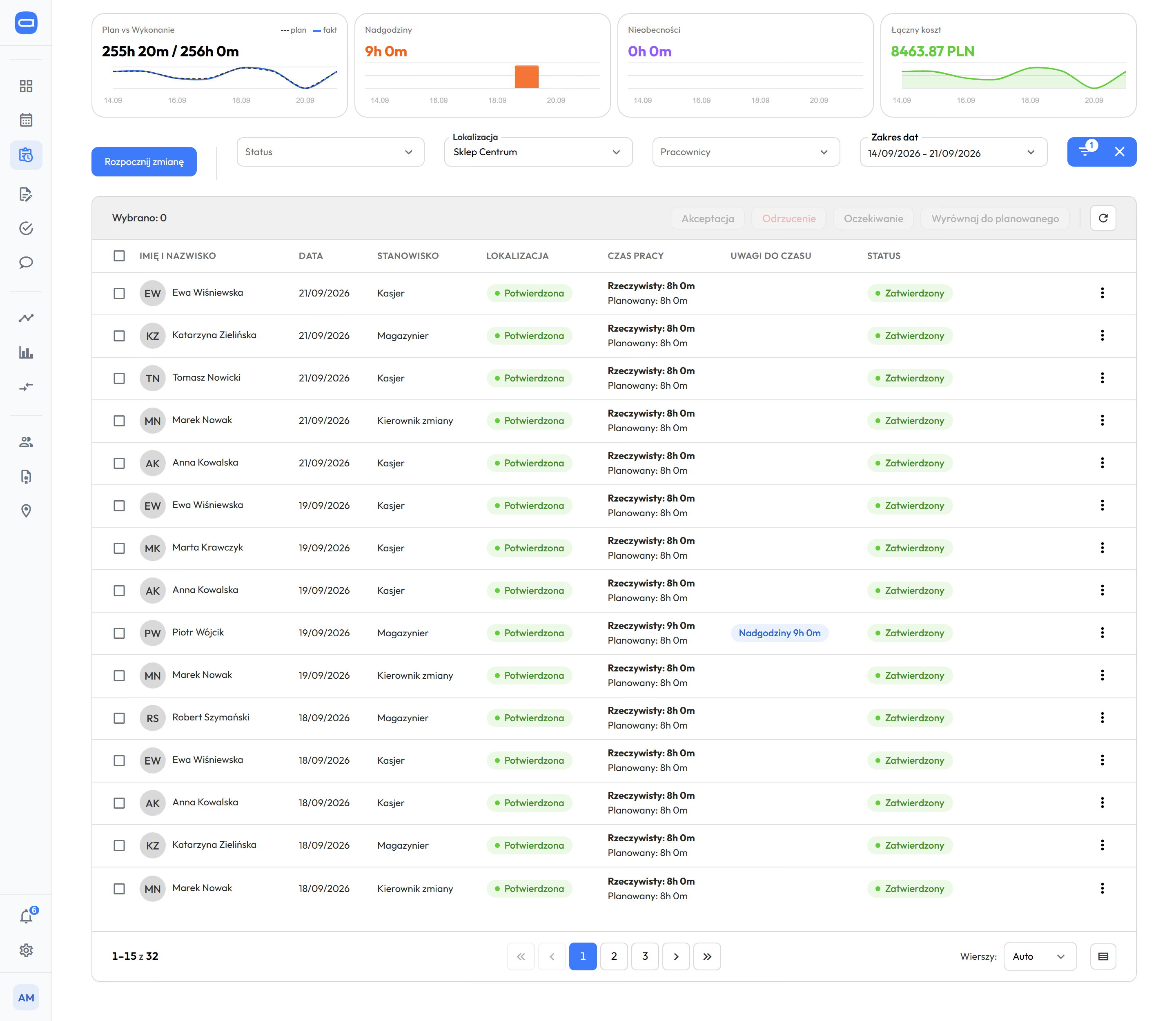
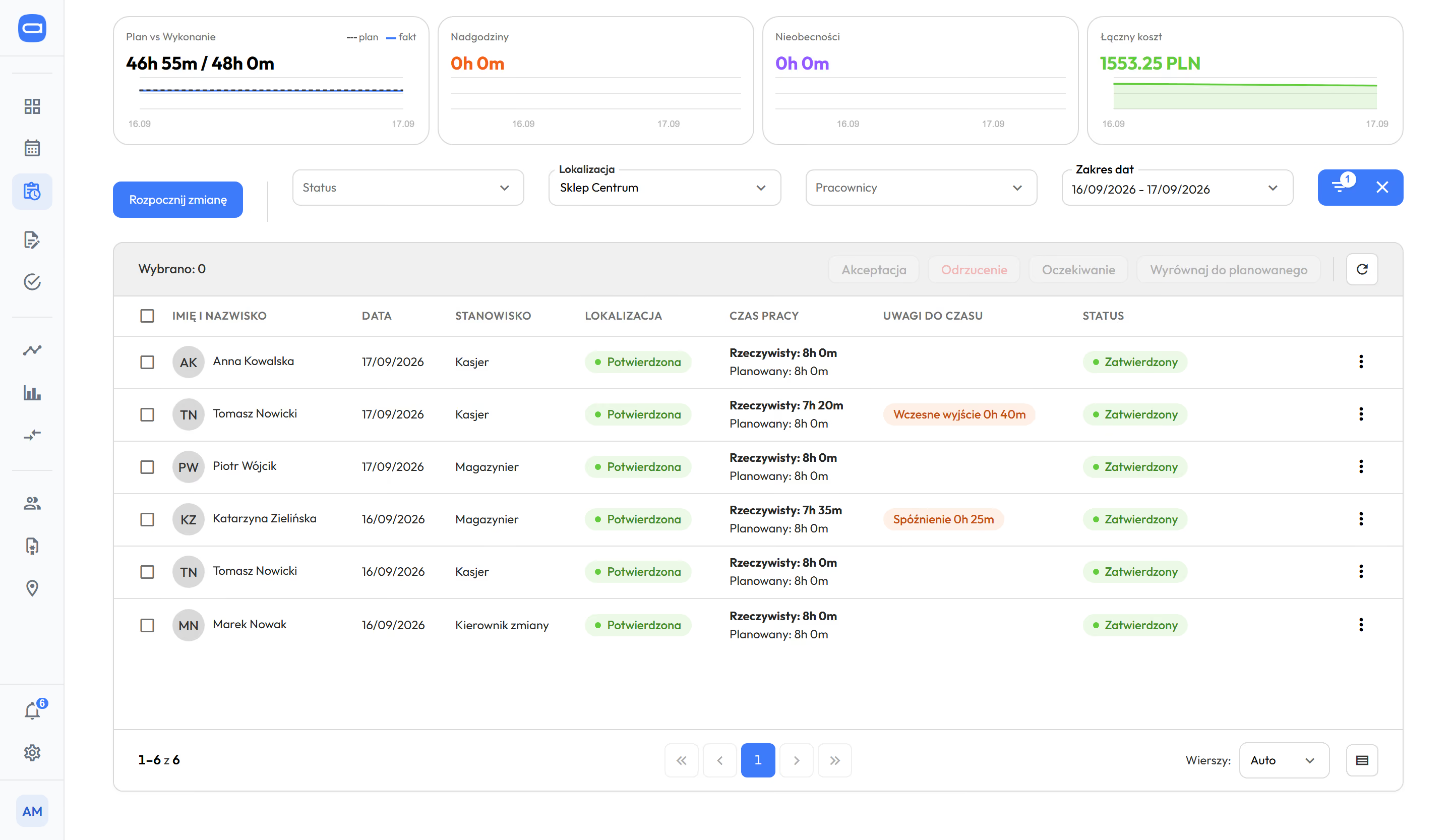
Time records: plan next to actual, notes on time at each entry, approval in one click. Demo data. The app is available in English.
Prices in US dollars (USD), excluding VAT.
We do not replace the HR and payroll system you have. We give it ready hours. Integrations, security and API
How do our people clock in for a shift, and how do we know it is true? fromBiznes
"How do you handle employees reporting for work, meaning real time tracking and not just working to the schedule, and the problem of lateness and leaving early?"
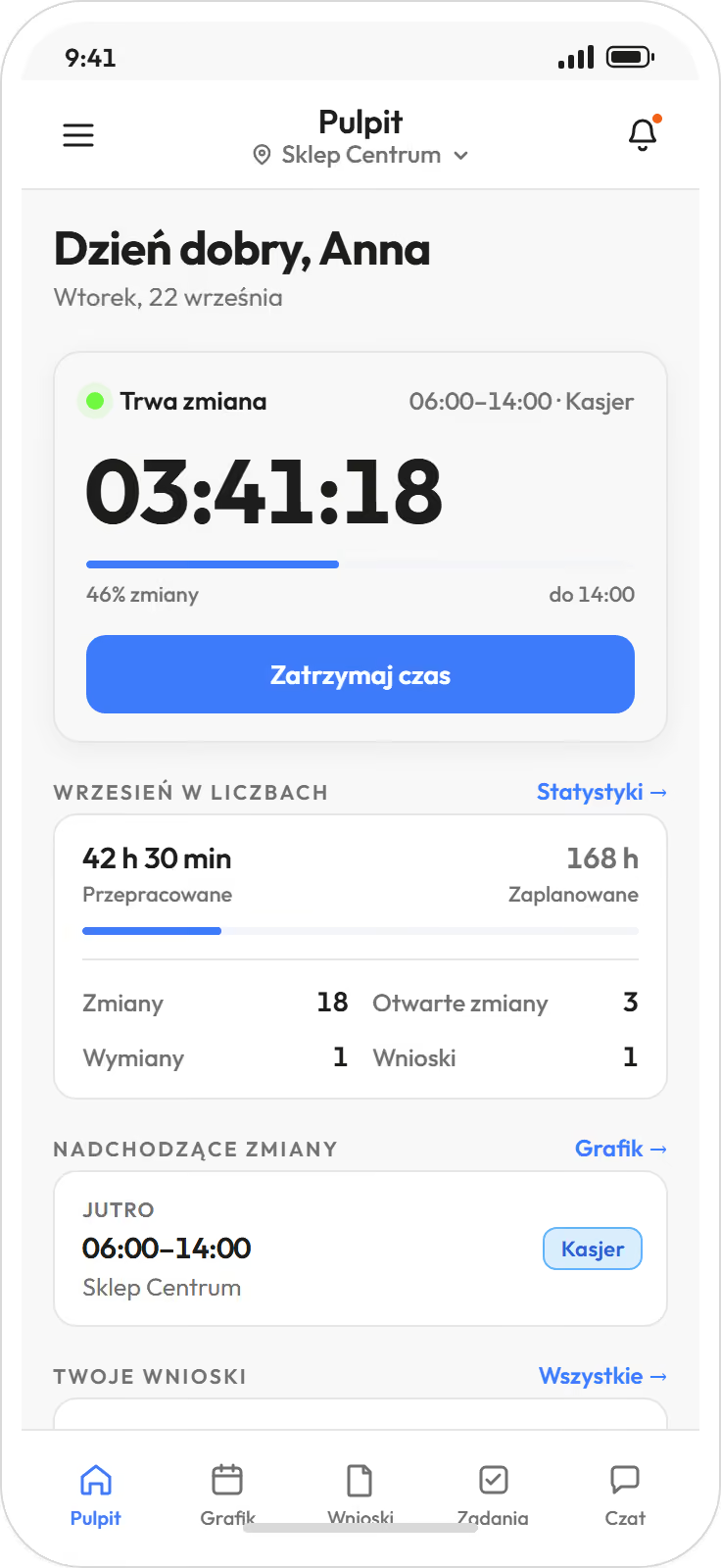
- 1The employee starts and ends the shift. One tap: start of shift, paid or unpaid break, end of shift. On the phone, at the kiosk or in the browser.
- 2 The entry sits next to the plan. Lateness and early leaving are a deviation from the planned shift, counted in minutes. Not a manager's opinion.
- 3 The manager approves, corrects or aligns the entry with the plan. The old value stays in the history.
- Every entry records its channel: phone, kiosk or browser.
- A clock-in from a phone records a GPS check.
- The full change history stays with the entry, with author and time.
You set rounding of clock-ins and clock-outs, the lateness threshold and night hours within the Labour Code, separately for each location. Rounding applies to time without work, such as arriving before the shift. Actual working time counts in full. from Biznes
A notification about lateness, early leaving and absence from a shift goes to the person who builds the schedule, or to all managers of the location, as you choose.
Working time records should show what happened and give ready hours for payroll. Nothing more.
Labour Code in the schedule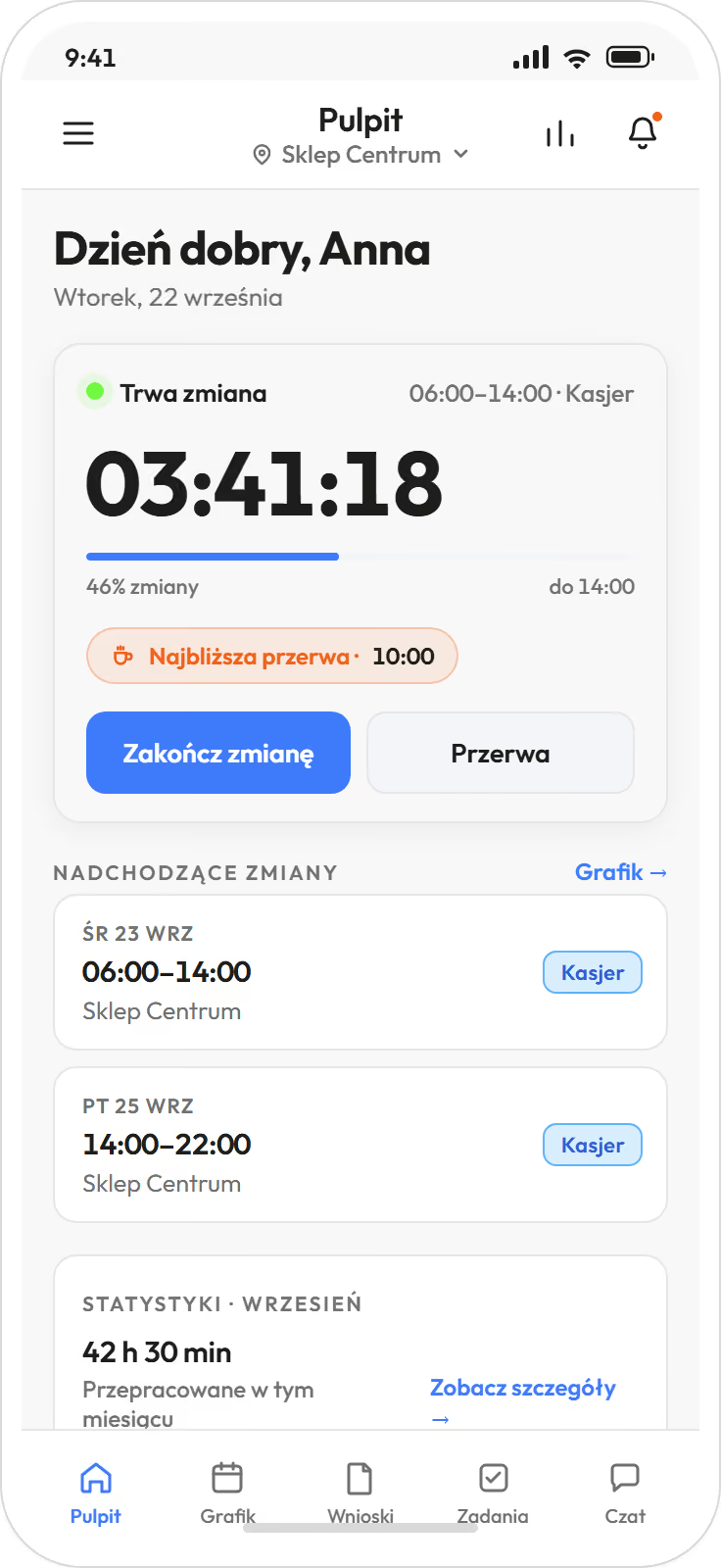
Phone, kiosk on a tablet or browser. No reader on the wall to buy. fromBiznes
You choose the channel for each location. The kiosk is an app on a tablet at the entrance, and there are seven ways to clock in, from a PIN to a card.
- Employee's phone.For teams in the field and for locations without a tablet. Clock-in with a GPS check.
- Kiosk on a tablet.An iOS or Android app, or a kiosk in the browser. For the factory floor, kitchen and warehouse, where phones stay in lockers.
- Browser.For the office and for a manager who starts a shift from the panel.
- app on the phone
- browser
- kiosk with PIN code
- kiosk with QR code
- kiosk with NFC card
- kiosk with RFID card
- kiosk in the browser
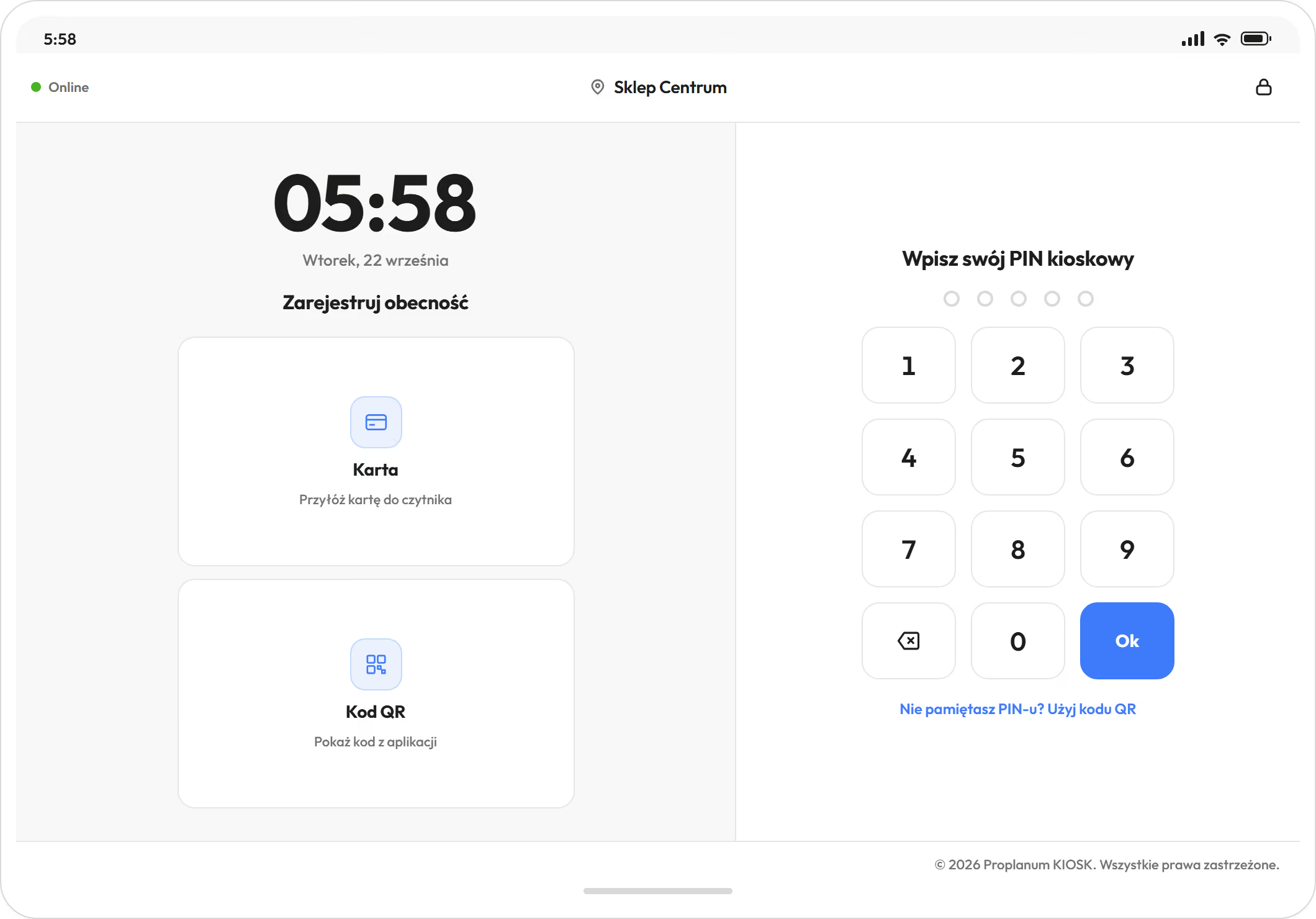
Offline, the kiosk still accepts PIN and QR code. fromBiznes
Clock-ins stay on the tablet and are sent when the connection returns. Every shift gets an entry.
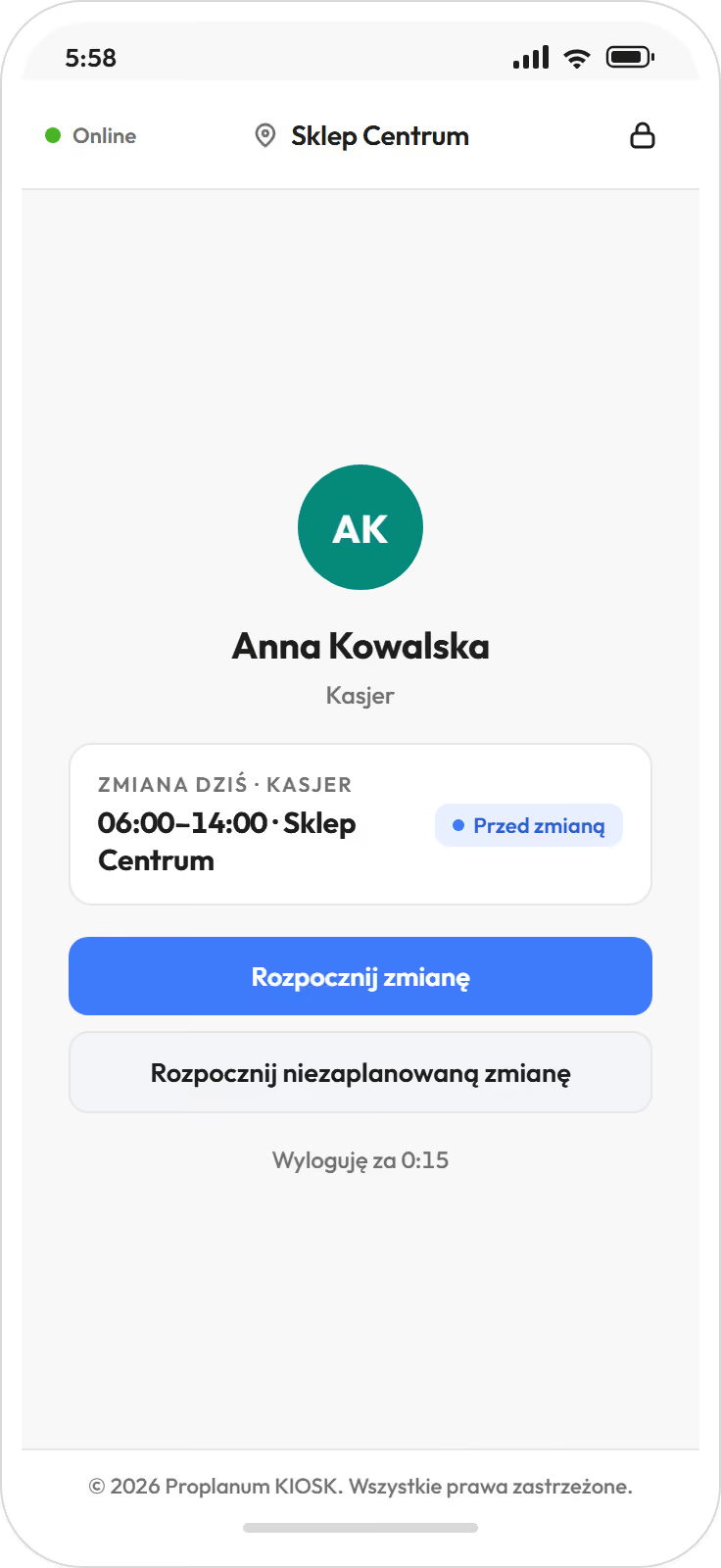
- The same kiosk screen in three set-ups: iOS app, Android app, web kiosk in a browser.
- Identification by PIN, by QR code from the employee's app, or by NFC or RFID card. Cards need a reader next to the tablet.
- Offline mode works for PIN and QR code. Cards need a connection.
- A clock-in from a phone runs a GPS check. Each location has coordinates and a radius, and the phone measures the distance at the start of the shift. Outside the radius the shift can still start, but the entry gets the note "no location", which the manager sees at approval. 158employees using the mobile app. Large mountain hotel, as of the implementation report.
- The kiosk confirms the clock-in on screen, so the employee knows it is saved.
Records build up from clock-ins all month, not from a spreadsheet after it. fromBiznes
Hours sit next to the plan in every location, during the month. The manager approves entries as they come, and HR gets a finished month without retyping.
- Records view: plan and actual, overtime, absences, cost and a queue of entries to approve.
- Single and bulk approval. Entries that match the plan approve themselves. An entry with a deviation you align with the plan or correct, and the correction stays in the history with author and time.
- Time entries review (from Biznes): all entries in one view, with filters for lateness, overtime and missing clock-outs. You correct in the row and approve in bulk, also with a large number of entries. new
- Overtime follows from the working time standard and the schedule. The night work premium is counted for every hour worked in night hours, set per location within the Labour Code. Differences show in the week they arise, not after month end.
- Summaries (from Biznes): hours, overtime at 50% and 100%, cost, plan next to actual and the amount to pay.
- Locations side by side in one view: plan, actual, overtime and cost per hour (location comparison from Premium).
- Export of hours, absences and overtime to the HR and payroll system you have, with import instructions.
- For HR: every correction has an author and a time, and the old value stays in the history. Your HR team confirms the scope of records you need.
One day at the till: scheduled shift, clock-ins, difference and what happens to the entry. A drawing, not a screen.
A paper attendance list or a kiosk at the entrance: what changes.
For a small team a paper attendance list is fine. A kiosk starts to make sense when entries must be added up for several teams or several locations.
Already have a reader at the door?
The reader can stay as the source of hours on your side. The schedule, plan next to actual and payroll run in Proplanum alongside it.
Integrations, security and APIQuestions asked before the first clock-in.
We already have a reader at the entrance. Why do we need a second one?
Proplanum puts actual hours next to the planned shift and hands them to your HR and payroll system. If the reader is to stay, it stays, and you keep its hours on your side. A 21-day trial in one location will show whether two sources make sense or one is enough.
Can an employee clock in for someone else?
The kiosk recognises the person by PIN, by QR code from their app or by card. A clock-in from a phone records a GPS check. Every entry has a channel, a time and a change history, so the manager can see where each entry came from.
What happens when the internet goes down at a location?
Nothing bad at the kiosk. Without a connection the kiosk accepts PIN and QR code, saves clock-ins on the tablet and sends them when the connection returns. Cards need a connection.
How do you count lateness and early leaving?
As a deviation from the planned shift, in minutes. You set the threshold and rounding separately for each location. The manager can correct the entry or align it with the plan, and the correction stays in the history.
Are the working time records from Proplanum enough for an inspection?
The records are built from clock-ins and corrections, each with author and time. You can export and print them together with an attendance list for signing. Your HR team confirms the scope of records you need.
Where is this data stored?
In Microsoft Azure in the European Union, with regular backups. We sign a data processing agreement (DPA) with every customer. Details are on the integrations and security page.
We use another system. What does data transfer cost, and will it stop our work?
Data transfer with a self-service start is part of implementation, included in the price. Import from several systems is quoted together with implementation. We have tools to make it quick without disrupting your work. You choose the date.
Is there a fingerprint option?
Not yet. Fingerprint support is ready, and we switch it on once the reader in the kiosk is confirmed. Today the kiosk recognises a person by PIN, QR code or NFC or RFID card, and the phone adds a GPS check. That is enough for every entry to have a person, a channel and a time.
A 21-day trial in one location, with no card and no commitment.
- Sign-up takes a few minutes.After a short call we activate your account for 21 days.
- Employee list.As a file or by hand.
- First clock-ins by phone.The kiosk on a tablet at the entrance follows, with your account manager, at your pace.
Hours go to nine HR and payroll systems used in Poland, with import instructions, plus two-way ADP and e-ZLA sick notes from ZUS, the Polish social insurance institution. Moving from another system? Data transfer with a self-service start is part of implementation, included in the price. Import from several systems is quoted together with implementation.
nine systems
- Comarch Optima
- R2Płatnik
- enova365
- Symfonia
- Gratyfikant GT
- Gratyfikant nexo
- Wapro Gang
- SAP
- DATEV LODAS
A dozen locations or more? Book a 30-minute call.
Thank you, we have your details.
We will call you back on the number you gave. Monday to Friday, 8:00 to 16:00, Central European Time (CET), we reply the same day. After 16:00 and at weekends, we reply by 12:00 on the next working day.