Restaurant schedule: floor and kitchen, one restaurant or several.

The floor is staffed for lunch and dinner, the kitchen starts earlier, and the schedule fits both.

Proplanum prepares the restaurant schedule from your staffing rules, separately for floor and kitchen. The restaurant manager corrects and publishes it from a phone. The team sees shifts in the app and swaps there. You see a shift's cost before it is approved.

On the call we compare staffing and demand in one restaurant on one day, on your numbers.

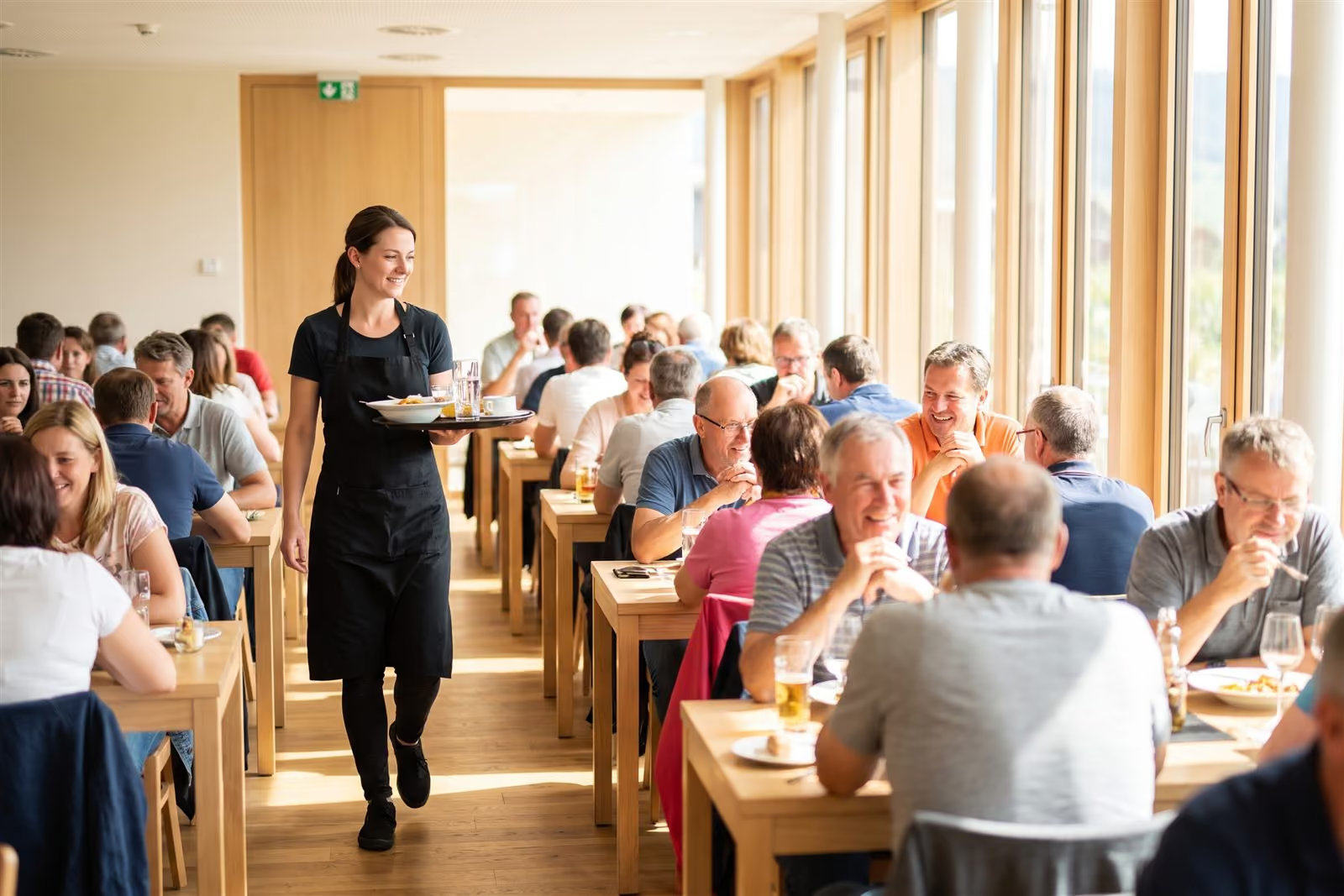
A waitress with a tray between busy tables in a full, bright restaurant

Two rhythms in one day: the kitchen starts earlier, the floor grows at lunch and dinner. Illustration, not a screen.

21 days, no card with account manager Start: schedule. Premium: automation from $3.50 per employeePricing

This is how owners and restaurant managers describe the schedule before we talk.

  1. 1

    “On Friday at seven we are short of hands, and at three on a Tuesday, three people stand by two tables.”

  2. 2

    “Half my evening goes on phone calls because someone cannot come, and shifts get passed around by text.”

  3. 3

    “I know there is a big booking on Saturday, but I made the schedule two weeks ago.”

This is the problem restaurants usually come to us with.

The floor follows guest demand; the kitchen starts earlier and ends after the pass. This page is for that rhythm, not a store and a till.

One restaurant or café.

Schedule from the phone, swaps and leave in the app, hours ready for the accountant. No restaurant comparison.

Swaps and availabilityFor a single restaurant

Several restaurants or a chain.

Staffing rules recorded once, restaurants side by side during the month, staffing to till data where you have it.

Floor and kitchenFor several restaurants

Came from an ad? This is an app in the browser and on the phone, for the owner, the restaurant manager and the team. The trial lasts 21 days and needs no card.

The floor reacts to demand, the kitchen starts earlier. The schedule fits both rhythms. schedule from Startautomation from Premium

  • You record staffing rules separately for floor and kitchen: how many on a shift, who is at the bar, who is on the pass. Plus a template for a normal day and a weekend.
  • Proplanum drafts the schedule from these rules; the restaurant manager corrects and publishes it with a notification. automation from Premium
  • Before publishing, the manager sees staffing hour by hour and the hours and cost of each person. You know a shift's cost before it starts.
  • With till or POS data, the schedule follows guest demand hour by hour, through an integration built for your systems as part of implementation, or by file or by hand. A group booking goes in as a task for that evening and adds staffing. demand-based staffing from Premium
  • Without till data, staffing rules still build the schedule.

Proplanum does not replace the restaurant manager or the head chef. It takes the scheduling off them.

Work schedule: how Proplanum builds shifts
The floor follows bookings, the kitchen starts an hour earlier, and a split shift covers both peaks. Illustration, not a screen.

“How do you handle employees clocking in at work, not just following the schedule?”

question from a restaurant, email before a call, shortened

How do we know who was really on shift, not just on the schedule? fromBiznes

  1. 1

    The employee clocks in and out in the app or on the tablet at the restaurant entrance.

  2. 2

    The clock-in channel and time are saved in the history. The restaurant has coordinates and a radius, so the phone runs a GPS check. Outside the radius a shift can start without location, and this is recorded.

  3. 3

    Plan and actual hours sit side by side the same day. Late starts and early finishes show at once, not after payday.

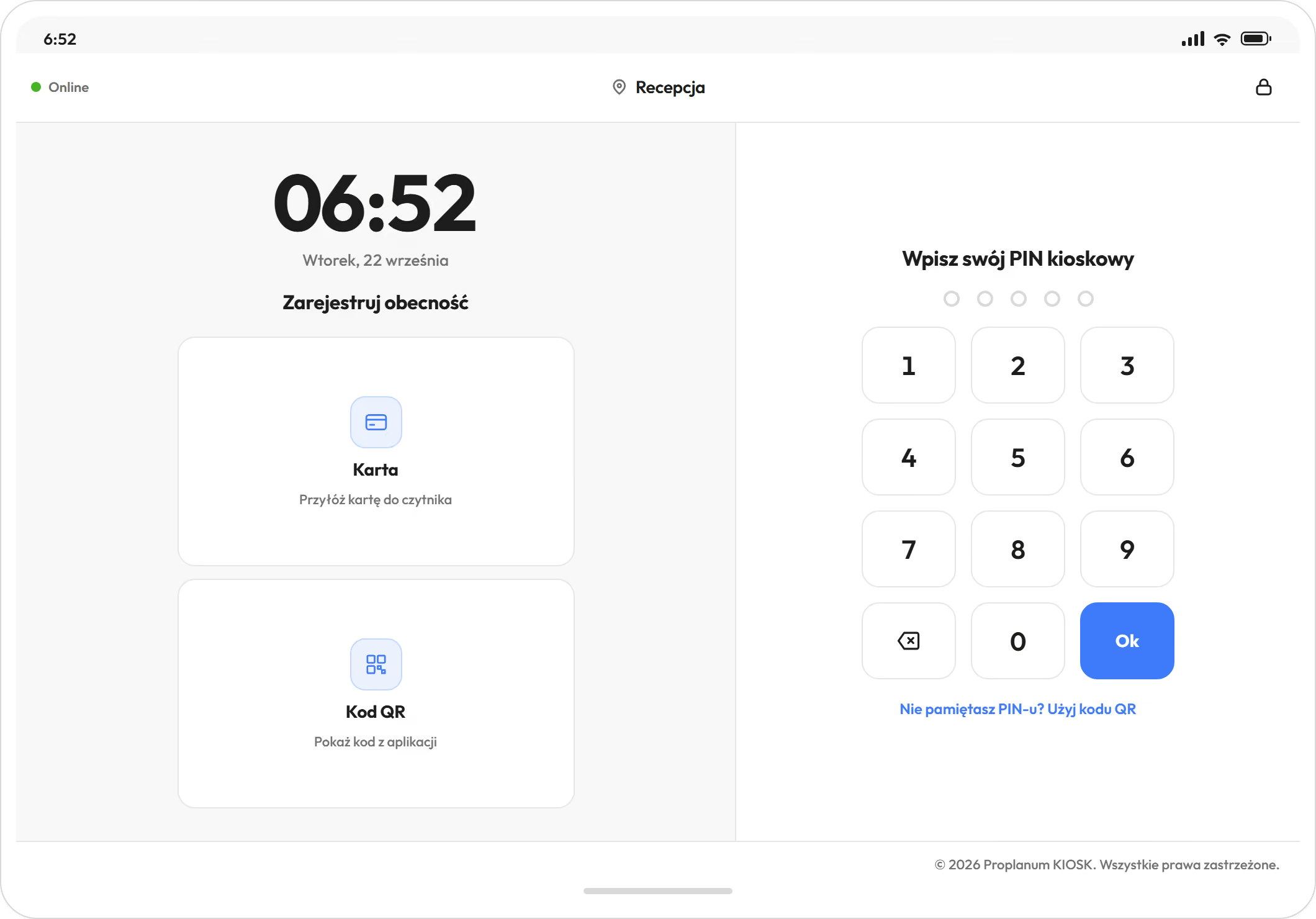
  • The kiosk runs on a tablet with a PIN, a QR code or a proximity card. Without internet access it accepts PIN and QR code clock-ins and sends them later.
  • Rounding and lateness thresholds are set for each restaurant. An absence alert goes to the person you choose. Every correction stays in the history.

This is counting hours, not judging people. The same records protect an employee who stays late.

Time tracking and kiosk
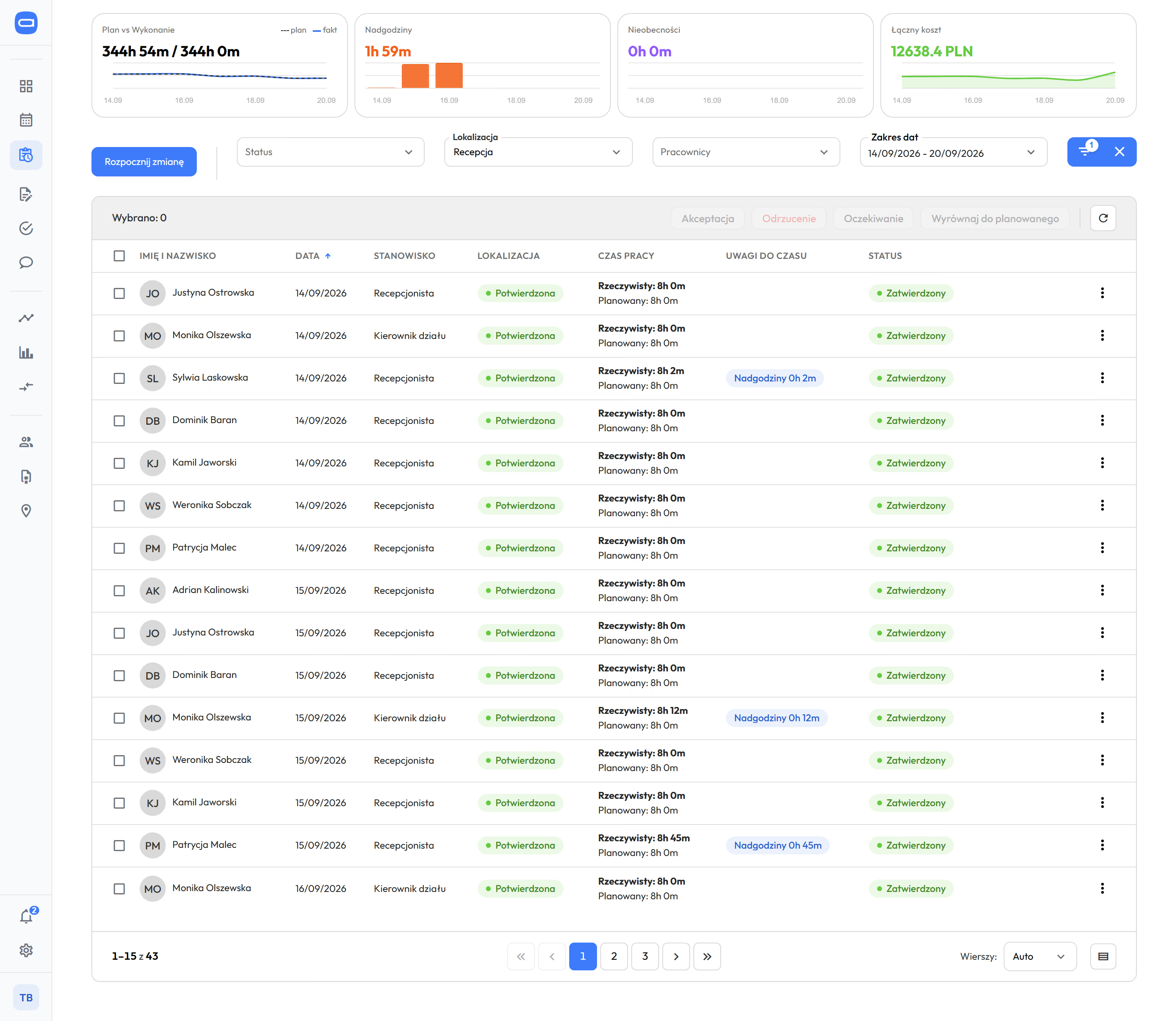
Time tracking in Proplanum, week of 14 to 20 September at a hotel reception: tiles for plan and actuals, overtime, absences and total cost above the list, below them the first eight entries with date, position, confirmed location, actual time next to planned and an overtime note on two entries
A tablet kiosk in a hotel, Tuesday 22 September at 6:52: clock, card or QR code clock-in and a PIN keypad
A tablet kiosk at the restaurant entrance, with a week of time entries next to the plan behind it, overtime on the entry. Demo data. The app is available in English.

Swaps, availability and requests go through the phone, not a group chat. fromStart

  • An employee offers a swap or hands over a shift, another employee takes it, the manager approves with one tap.
  • The manager posts an unassigned shift as an open shift, and people who can take it get a notification.
  • Before approval, Proplanum checks Labour Code rules and shows the manager when a swap would cut someone's rest.
  • One-off and recurring availability: a student with Tuesday classes enters it once. Automatic scheduling from your staffing rules uses it (from Premium).
  • Leave requests with your own types, other requests also for part of a day. Approved leave shows in the schedule at once.
  • Quiet hours at night and a reminder before each shift. The phone does not wake the cook after a late shift.

The manager stops being a switchboard, and the decision stays with them.

Leave requests, availability, swaps and open shiftsWhat your team will see

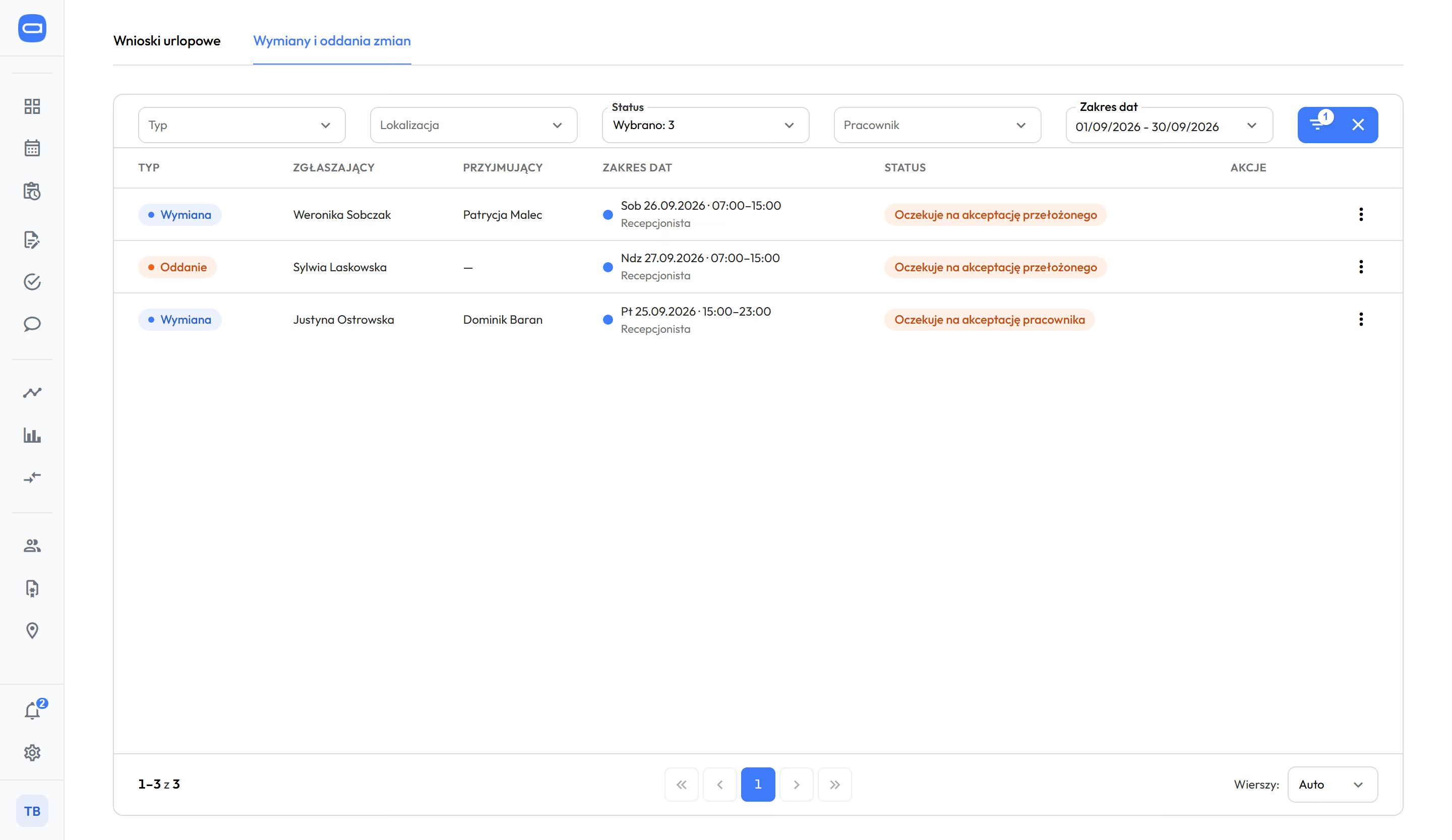
The queue of shift swaps and handovers at a hotel, September: two swaps and one handover of a receptionist's shift, each with date and hours, two awaiting the manager's approval, one awaiting the employee's
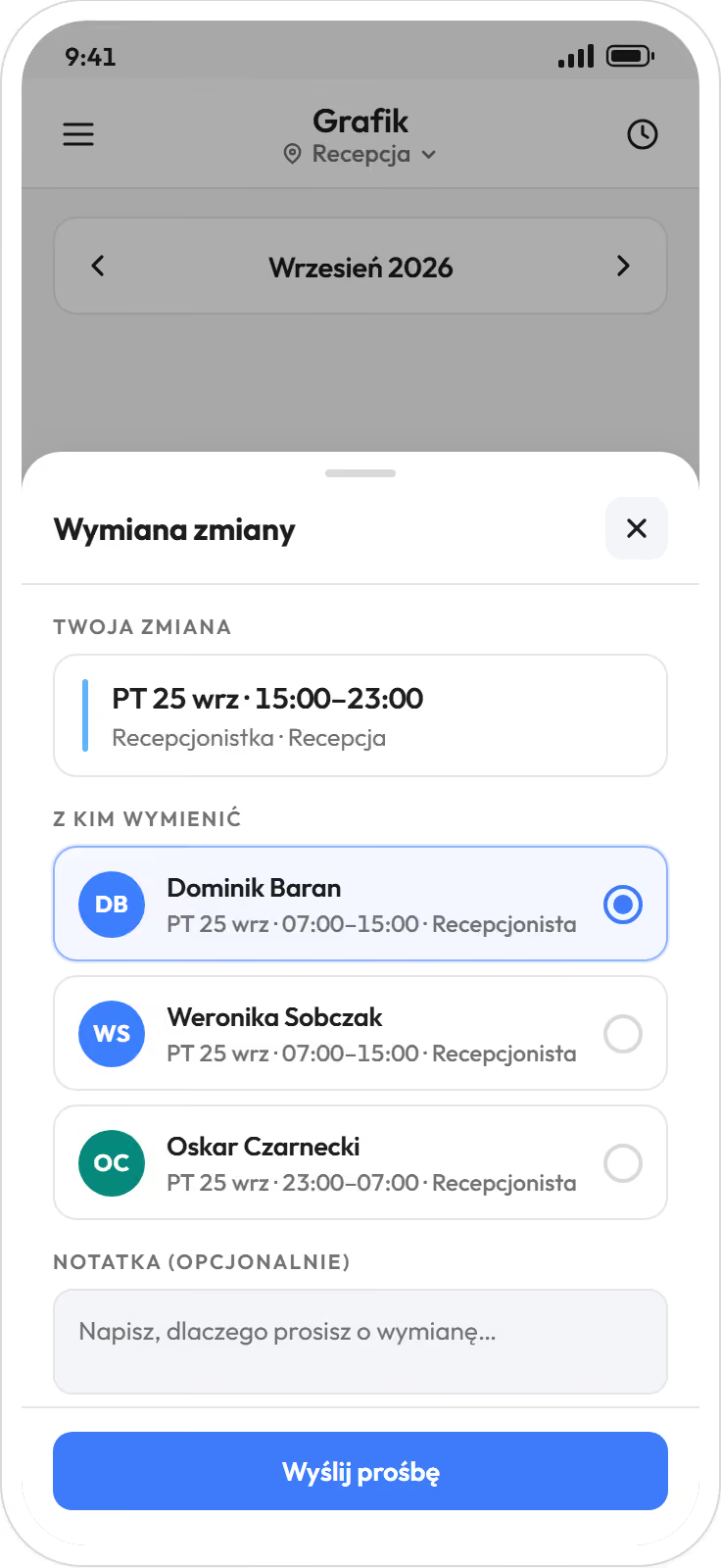
Employee app: a swap offer for a Friday shift from 15:00 to 23:00, choosing one of three people working that day, and a send button
A shift swap offer in the employee app, with the queue of swaps and handovers to approve behind it. Demo data. The app is available in English.

Civil-law and employment contracts in one schedule and one set of records, hours to payroll without retyping. employee record from StartSummaries from Biznes

  • Contract, FTE and hourly rate sit in the employee record. A person on a civil-law contract (umowa zlecenie) has shifts in the same schedule as an employee.
  • Hours, absences and overtime go to your HR and payroll system, with import instructions. You send the same file to your accounting office.
  • Summaries show hours, overtime and cost, restaurant by restaurant, during the month. from Biznes
  • An electronic sick note (e-ZLA) from ZUS, the Polish social insurance institution, takes the person off shifts and notifies the manager.

Labour cost shows during the month, not after it closes.

Integrations and security

The owner, the restaurant manager and the accountant work with the same hours.

Three smiling cooks plate dishes at the pass of a bright restaurant kitchen, heat lamps and steam over the plates
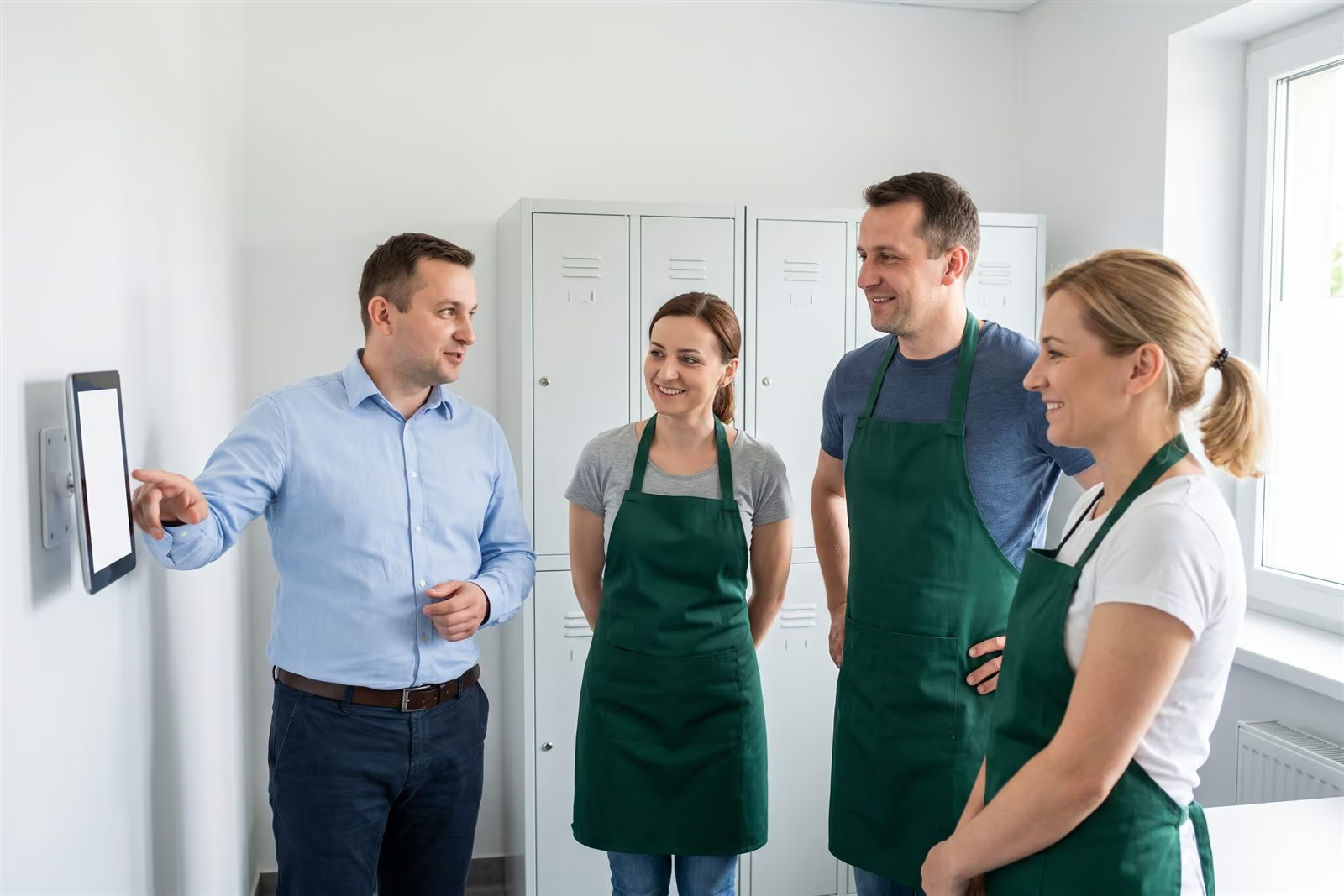
An implementation manager shows three employees in green aprons a kiosk tablet in a bright staff room
A waitress with a tray between busy tables in a full, bright restaurant
Owner of a restaurant chain

Sees a shift's cost before publishing and restaurants side by side during the month.

  • staffing hour by hour and cost per person, in the schedule
  • restaurants side by side: plan, actuals, overtime, cost per hour (from Premium)
  • staffing to till demand where you have data (from Premium)
Location comparison and reports
Restaurant manager and head chef

Builds the schedule from the phone and stops being a switchboard.

  • ready schedule to correct, published with a notification
  • swaps and open shifts approved with one tap
  • who is on shift today, next to the plan
Work schedule
HR or accounting office

Gets hours for all contract types ready for payroll.

  • working time records, edit history, print, export
  • overtime 50% and 100%, nights, Sundays, public holidays
  • payroll export, e-ZLA sick notes from ZUS automatically
Labour Code and working time

Your team gets the app: schedule on the phone, swaps and requests without calling the manager. What your team will see

The employee file tracks when each kitchen employee's medical certificate for work with food expires, and the schedule can refuse a shift without a valid one.

Restaurant schedule, swaps and civil-law contracts in every plan. Actual hours from Biznes, automation from Premium.

Three steps; each includes the one before.

Start

from $3.50

  • restaurant schedule on the phone, floor and kitchen
  • contracts and rates in the employee record, Labour Code
  • requests, shift swaps and open shifts
  • payroll export
here hours become actuals

Biznes

from $4

  • clock-ins from the app and the entrance tablet
  • records with approval of hours and alerts
  • Summaries with cost per restaurant
  • tasks for a shift

Premium

from $4.50

  • automatic scheduling from your staffing rules
  • demand-based staffing from tills and POS
  • restaurants side by side
  • team chat

Enterprise: chain of dozens of restaurants, integrations with other systems, API, SLA, dedicated account manager. Quote after a call.Book a 30-minute call

Per employee per month, billed annually. Prices in US dollars (USD), excluding VAT. The employee file is an add-on to every plan at $0.50 a month per employee; once enabled, it covers all employees of the company.

Compare plans

We implement from a few to several hundred locations. The rules are the same for one restaurant.

Accounting software and HR and payroll systems count hours after the month closes. Proplanum plans them earlier, shows them restaurant by restaurant during the month and hands the result to your systems.

  • 10 rulesof the Labour Code with your own thresholds, and a warning or block mode for the organisation.Product, September 2026.
  • 7 waysto track time: phone, browser, browser kiosk and tablet kiosk with PIN, QR code, NFC or RFID card.Product, September 2026.
  • 9 systemsfor HR and payroll used in Poland, with import instructions; plus ADP and e-ZLA from ZUS.Product, September 2026.
  • about 9% lower labour cost with service levels maintained, in three months.Store chain. A retail result, not a restaurant one.

Each number has a period and a customer type, never a name.

Three smiling cooks plate dishes at the pass of a bright restaurant kitchen, heat lamps and steam over the plates

Questions we hear before a trial in a restaurant.

They clock in and out in the app or on the tablet at the restaurant entrance. The clock-in channel is saved in the history, and plan and actual hours sit side by side the same day. Time tracking is from the Biznes plan.

It does not replace them. Their rules are recorded, Proplanum prepares a ready schedule, and they correct and approve it. With swaps and leave they stop being a switchboard.

Yes, separately for floor and kitchen. The manager corrects and approves; nothing is published without them. Automatic scheduling from your staffing rules is in Premium, manual and template scheduling in Start.

Yes. The schedule, swaps, time tracking and hours for payroll work without sales data. Demand-based staffing is an option if you have till or POS data.

Yes. You build the schedule on the phone, the team swaps in the app, and hours are ready for the accountant. The Start plan is enough to begin, without restaurant comparison.

Start costs $4 per employee per month, Biznes $4.50 and Premium $5, excluding VAT. Billed annually: $3.50, $4 and $4.50. Every account counts as one licence, and you change the number monthly. For more than 200 employees we prepare a custom quote.

With a self-service start, data transfer is part of implementation included in your plan. Import from several systems is quoted with implementation. Our tools make it quick and keep your work running. You choose the date.

The contract term is agreed individually, with monthly or annual billing. You decide what happens to your data after you leave. We sign a data processing agreement (DPA) with every customer.

A 21-day trial in one restaurant, no card and no commitment.

  1. Sign-up takes a few minutes.After a short call we activate your account for 21 days.
  2. Team list.By file or by hand, with all contract types.
  3. First schedule with an account manager.Remotely, at your own pace.
Start a 21-day trial

schedule from Start, automation from PremiumPricing

A remote start with an account manager and online training is included in the plan price. On-site days and training in your restaurants are quoted separately, with the price agreed before the start. The till integration is built for your systems as part of implementation. With a self-service start, data transfer is included in implementation; import from several systems is quoted with it.

Several restaurants? Book a 30-minute call.

gastronomia
Enter the name of the person we should speak to.
Enter the email address we should reply to.
Enter the number we should call you back on.
Choose a range so we can pick an example of a similar size.

Monday to Friday, 8:00 to 16:00, Central European Time (CET), we reply the same day. After 16:00 and at weekends, we reply by 12:00 on the next working day.

By sending the form, you agree that we may contact you about the call. Privacy Policy.

Thank you, we have your details.

We will call you back on the number you gave. Monday to Friday, 8:00 to 16:00, Central European Time (CET), we reply the same day. After 16:00 and at weekends, we reply by 12:00 on the next working day.

The form could not be sent. Please try again or call us on +48 503 700 111.

+48 503 700 111info@proplanum.com

Already using the app? Log in or visit the help centre in English.