
The Labour Code and working time in the schedule, for shift-based businesses: one location or a chain.
A rest breach shows on the shift in the schedule, not in the records a month later.
Proplanum checks the schedule against the Labour Code: ten rules at every shift, before the schedule reaches the team. Your company chooses whether a breach gives a warning or a block. Proplanum takes the working time system and standard from each employee's record. It counts overtime, night work premium, Sundays and public holidays during the reference period (the period over which working hours are settled), not after it. The Labour Code rules in Proplanum are configurable: you set your own thresholds and choose a warning or a block, and we can set the rules up individually for your company.
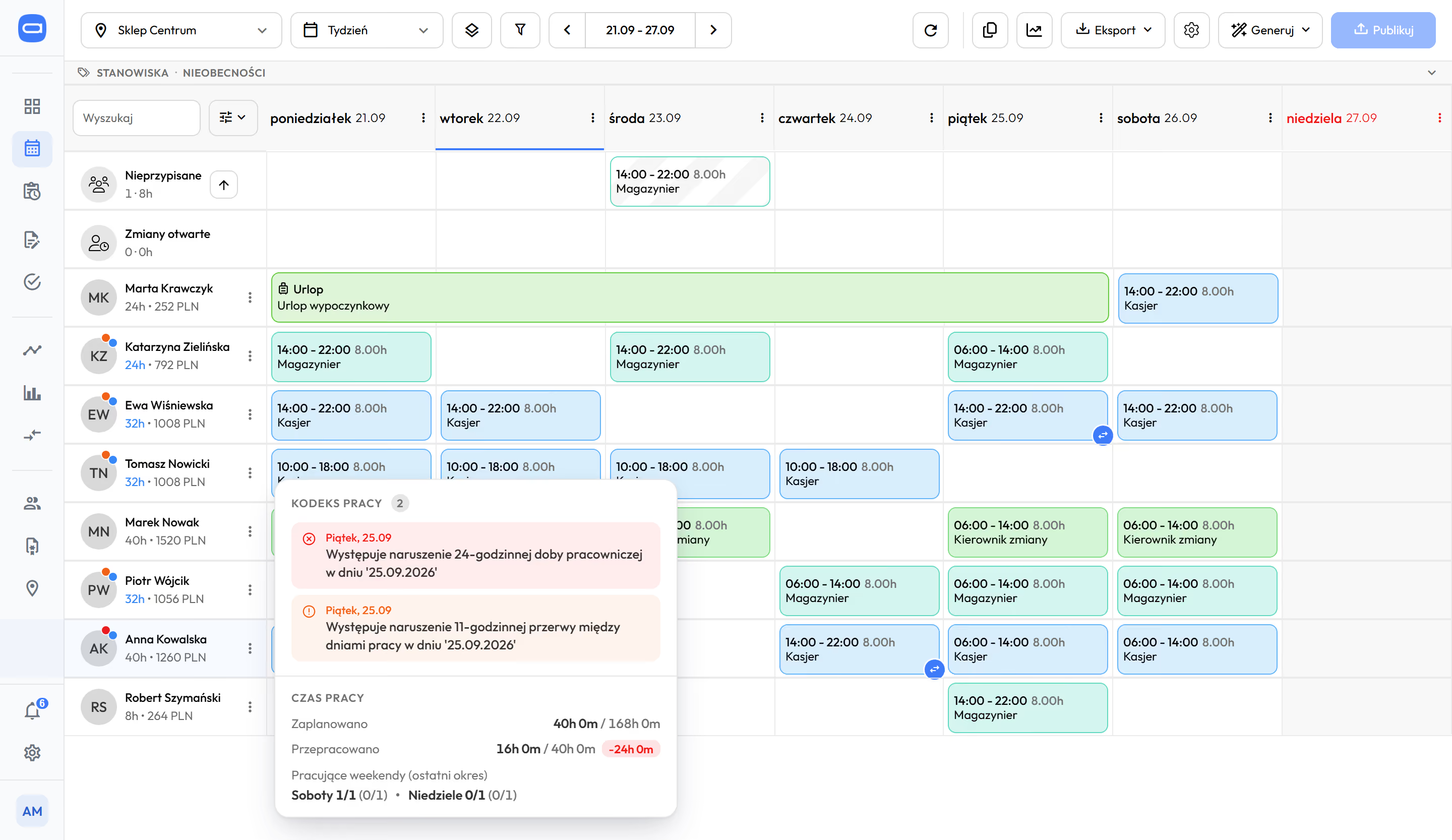
Employee pop-up in the schedule with a note about a breach of the 11-hour daily rest. Demo data. The app is available in English.
Prices in US dollars (USD), excluding VAT.
An HR and payroll system finds a breach after the month closes. Here you see it before the schedule is published.
Ten rules with your own thresholds, and your company decides between a warning and a block. fromStart
Each rule has its own switch and its own value. You enter your thresholds, not ours.
A warning leaves the decision to the manager. A block stops the manager from saving a shift that breaks the rule. An administrator or HR can knowingly save a single shift despite the block, after a clear confirmation. This is your company's setting, not a rule we impose.
- Daily rest. The gap between the end of one shift and the start of the next.
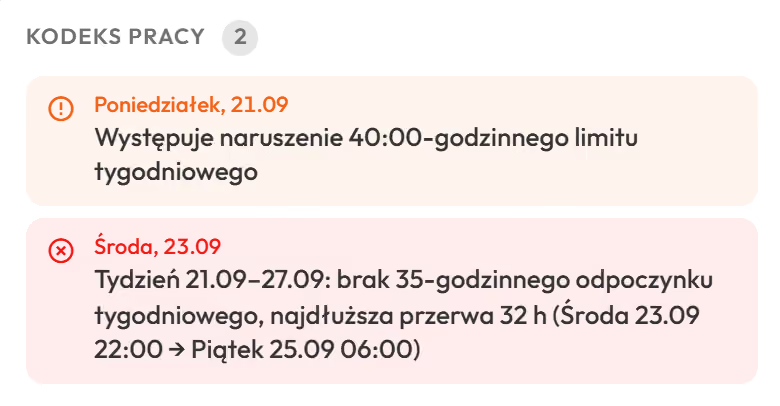
- Weekly rest. An unbroken rest in every week of the period, 35 hours under the Labour Code. Example of a breach: the longest rest in the week lasts 32 hours, from Wednesday 22:00 to Friday 6:00. Proplanum flags the missing 35-hour rest next to the name.
- Daily hours limit. The longest shift you can plan for one person.
- Weekly hours limit. Planned hours in the week against the threshold you set. The Labour Code sets 40 hours on average in the reference period.
- Employee's working day (the 24 hours counted from the start of the shift). Proplanum checks the gap between starts of working days.
- Fourth working Sunday in a row. Proplanum counts the Sundays worked and shows when a fourth one in a row comes up.
- Weekend working time system. Proplanum checks that an employee on this system has shifts only on Fridays, Saturdays and Sundays.
- Equivalent working time system in healthcare (longer shifts balanced by shorter days in the same reference period). Standards and limits for healthcare providers.
- Rest after medical on-call duty. The rest after on-call duty before the next shift starts.
- Protected employees. Pregnancy, disability and night work protection each have a separate scheduling rule.
The rules check the schedule before it is published. Interpreting the law stays with your HR team.
Changes in labour law come into Proplanum at no extra charge. If a value you set yourself changes, your account manager will say what to update.
How scheduling works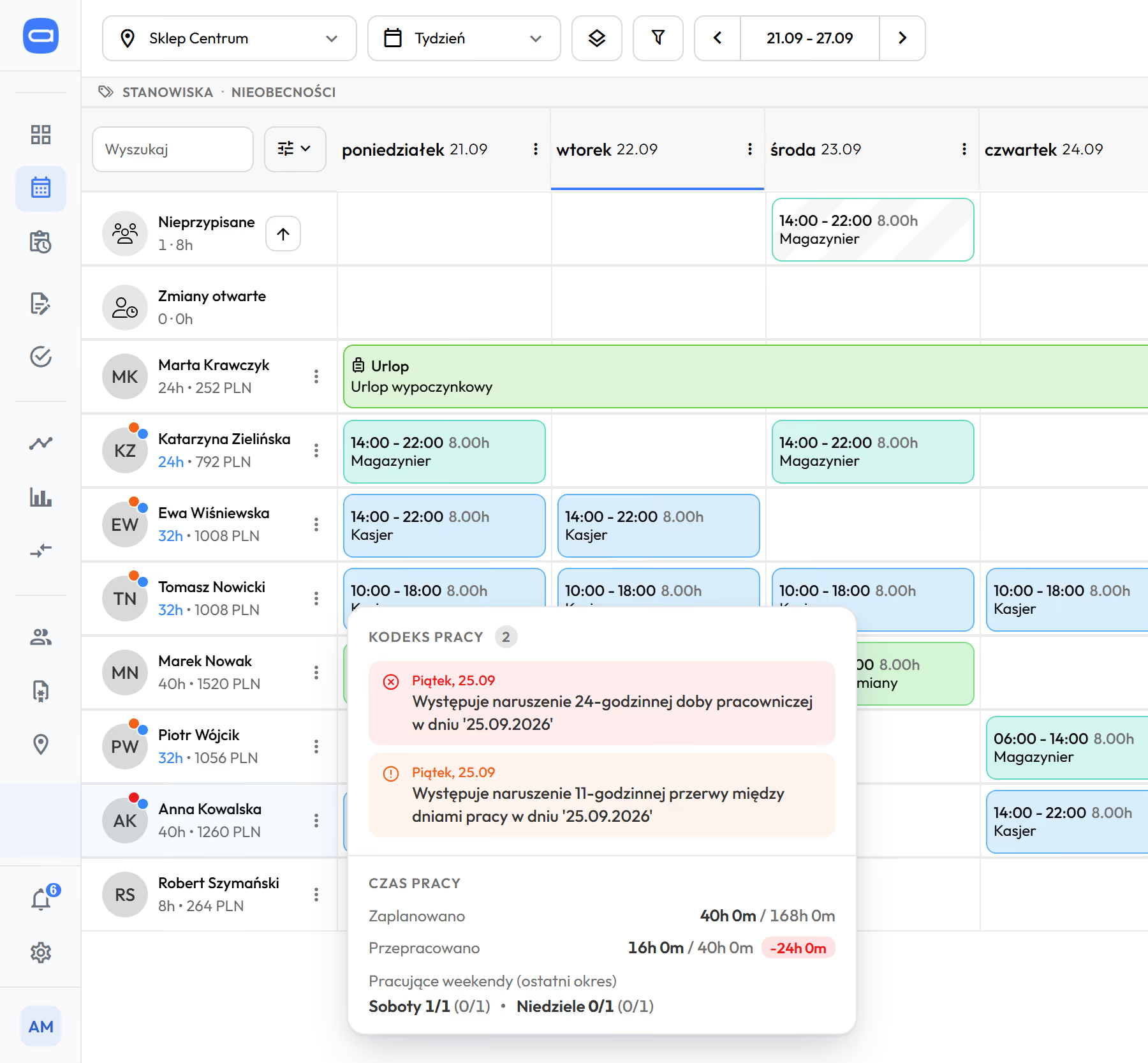
A Labour Code note next to the name in the schedule, before the shift is saved. Demo data. The app is available in English.
Three exceptions Proplanum knows from the law
- Rest when the employee moves to a different shift time.
- Rest for employees on medical on-call duty.
- The deadline for time off in lieu of overtime.
The working time system and standard sit in each person's record, so one location can run several systems at once. fromStart
HR sets the system once, with the contract. The schedule and Labour Code rules use it. Nobody re-enters the standard per schedule.
Working time systems
- Basic.
- Equivalent, 12, 16 and 24 hours.
- Weekend.
- Continuous operation.
- Equivalent in healthcare.
- The employee's working day counts from the start of work. You set the hour from which Sundays and public holidays count (6:00 by default).
Standards and contracts
- Daily standard per person, from the employee record.
- A severe or moderate disability lowers that person's standard to 7 hours a day. A part-time FTE lowers the required working hours, not the standard.
- When one person works in several locations on one contract, Labour Code rules count their shifts together.
- One person can hold several contracts with you at once. Proplanum counts each by its own rules and tracks time per person. Enterprise
- Medical on-call duty and standby are separate shift types. On-call duty counts as working time and towards the weekly limit, and rest is counted from its end. Standby counts as working time only when someone is called in.
- A standby call-in recalculates cost. Consents to work over the limit are logged separately.
- Polish healthcare law standards are built in: 7 hours 35 minutes a day, 11 hours of rest after on-call duty, on-call duty up to 24 hours, 48 hours a week on average, more only with the employee's written consent.
Daily, average weekly and period overtime shows during the period, not after it closes. rules from StartSummaries from Biznes
The balance of the reference period changes with every day of the schedule. You can correct it before the overtime happens.
Daily. Over the day's limit. Threshold per person and per working time system.
Average weekly. Over the weekly standard, averaged over the reference period.
Period. The whole period's balance, visible as it runs.
fromBiznes In Summaries you switch the source: records or schedule. So you can count overtime from the plan alone, before anyone works it.
- Time off in lieu of overtime at 1 to 1 or 1 to 1.5, with deadline tracking. The balance updates itself.
- Overtime at 50% and 100%, night work, Sundays and public holidays are counted automatically under Polish rules. You set the point from which they count separately for each location.
- A separate overtime tab in Summaries and two exports for payroll.
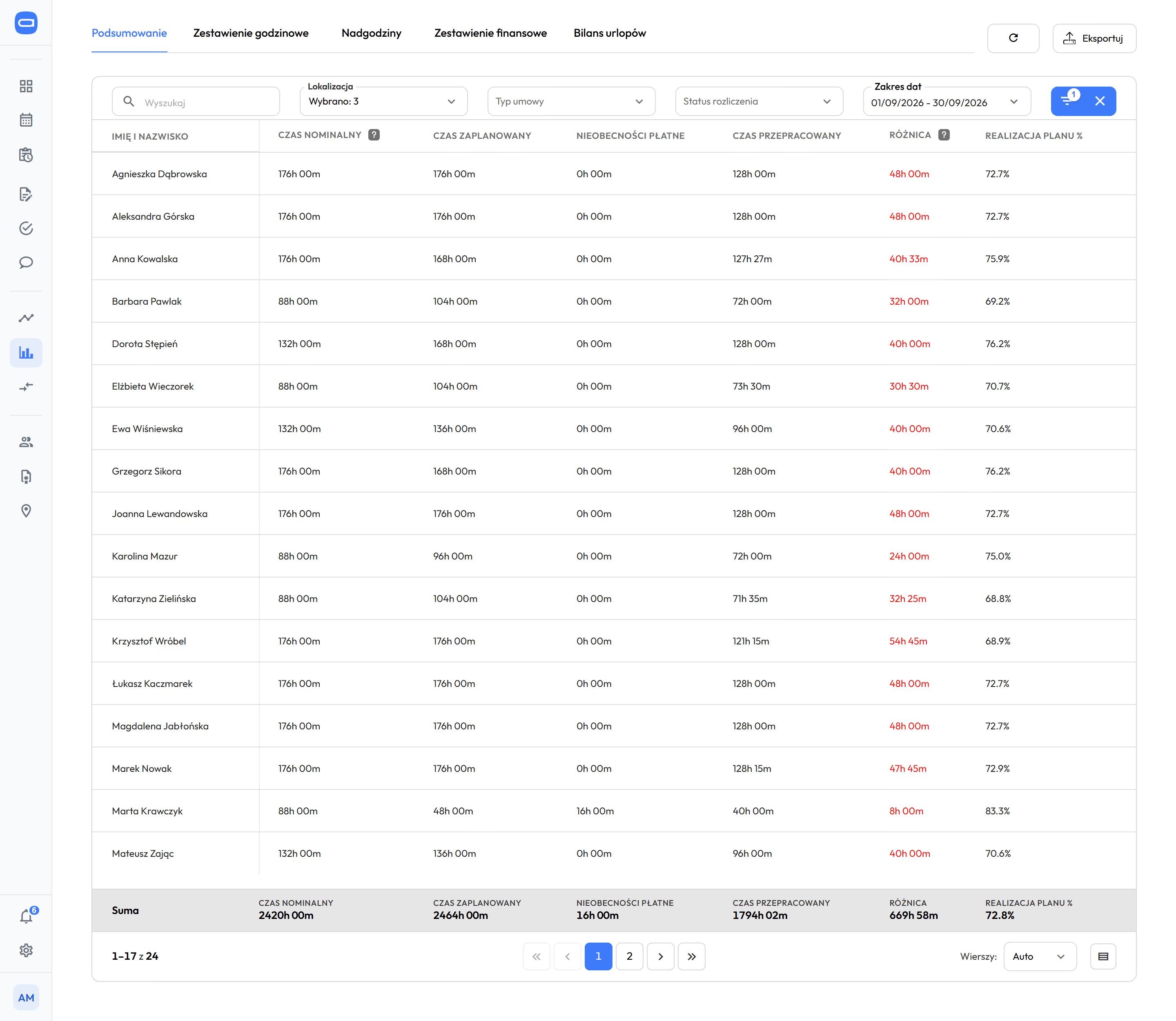
Records with change history, and hours ready for your HR and payroll system. records from Biznespayroll export from Start
Nobody retypes hours. Records are built from clock-ins and corrections, and at month end they produce a file with import instructions.
Records fromBiznes
- Built from clock-ins and manager corrections. Each has an author and time, and the old value stays in the history.
- Single, bulk or automatic approval for entries that match the plan.
- A change made in a published schedule also has an author and a time. Change history
Absences fromStart
- Your own request types, annual allowances, part-day requests.
- An electronic sick note (e-ZLA) from ZUS, the Polish social insurance institution, creates an approved request and removes the person from shifts. The shift goes to the unassigned pool and the manager is notified.
Hours, absences and overtime go to nine HR and payroll systems used in Poland, with import instructions.
The nine systems
- Comarch Optima
- R2Płatnik
- enova365
- Symfonia
- Gratyfikant GT
- Gratyfikant nexo
- Wapro Gang
- SAP
- DATEV LODAS
Plus two-way ADP and e-ZLA from ZUS. Your own export codes for the reports you build yourself.
"We don't retype hours" stops being a slogan. It becomes a file with instructions.
Integrations and APIQuestions HR asks before a trial.
What happens when the schedule breaks a rest rule?
It depends on your setting. Proplanum shows a message on the shift or blocks saving. You set the threshold of each rule separately.
We run the equivalent working time system and continuous operation in one company. Can we set that up?
Yes. The working time system sits in the employee record, so one location can have several systems at once.
Do we see overtime only after the reference period?
No. Proplanum checks the daily and weekly hours limits while you build the schedule. During the period you see the balance, and in Summaries you can also count overtime from the schedule alone. Summaries are included from the Biznes plan.
Does Proplanum replace our HR and payroll system?
No. It builds the schedule, collects actual hours and checks the rules. It hands the result to the system you have, with import instructions.
We run medical on-call duty and standby. How do you count them?
As separate shift types. On-call duty counts as working time and towards the weekly limit, and rest is counted from its end. Standby counts as working time only when someone is called in. A call-in from standby recalculates the cost, and consents to work over the limit are logged separately.
One person works in two of our locations. Is rest counted across both?
Yes, when they work in both on one contract. The employee has a main location and additional ones, and the Labour Code rules count their shifts together.
Some of our people have two contracts at once. Can Proplanum handle that?
Yes. It counts each contract by its own rules and keeps working time per person. Multiple profiles for one person are part of the Enterprise plan.
We use another system. What does data transfer cost, and will it stop our work?
Data transfer with a self-service start is part of implementation, included in the price. Import from several systems is quoted together with implementation. We have tools to make it quick without disrupting your work. You choose the date.
What do we need to prepare before the start?
A list of employees with FTE and working time system, the structure of locations and departments, and staffing rules for each day of the week. Plus a decision on which rules should warn and which should block saving. Your account manager sets up the rest during remote configuration.
A 21-day trial on your own schedule, with rules and thresholds set for your company.
- Sign-up takes a few minutes.After a short call we activate your account for 21 days.
- Employee list with FTE and working time system.As a file or by hand.
- Labour Code rules: which warn, which block.Your account manager sets the rest remotely.
Hours, overtime and absences go to the HR and payroll system you have. Moving from another system? Data transfer with a self-service start is part of implementation, included in the price. Import from several systems is quoted together with implementation.
A dozen locations or more? Book a 30-minute call.
Thank you, we have your details.
We will call you back on the number you gave. Monday to Friday, 8:00 to 16:00, Central European Time (CET), we reply the same day. After 16:00 and at weekends, we reply by 12:00 on the next working day.