Work schedule for water parks, trampoline parks, cinemas and clubs: one venue or several.Water park, trampoline park, cinema and other venues.

Weekend zone staffing is ready on Wednesday, from availability entered on the phone.

In water parks, trampoline parks, cinemas and clubs, Proplanum plans zone staffing for weekends and the season. You set out each zone's shifts in the schedule, even unassigned ones, and see gaps for the whole week before publishing. Your young team enters when they can work and swaps shifts in the app. A kiosk at the staff entrance collects clock-ins. Season hours go to the HR and payroll system you already use.

On the call we show zone staffing on one peak day: minimum, plan and gaps.

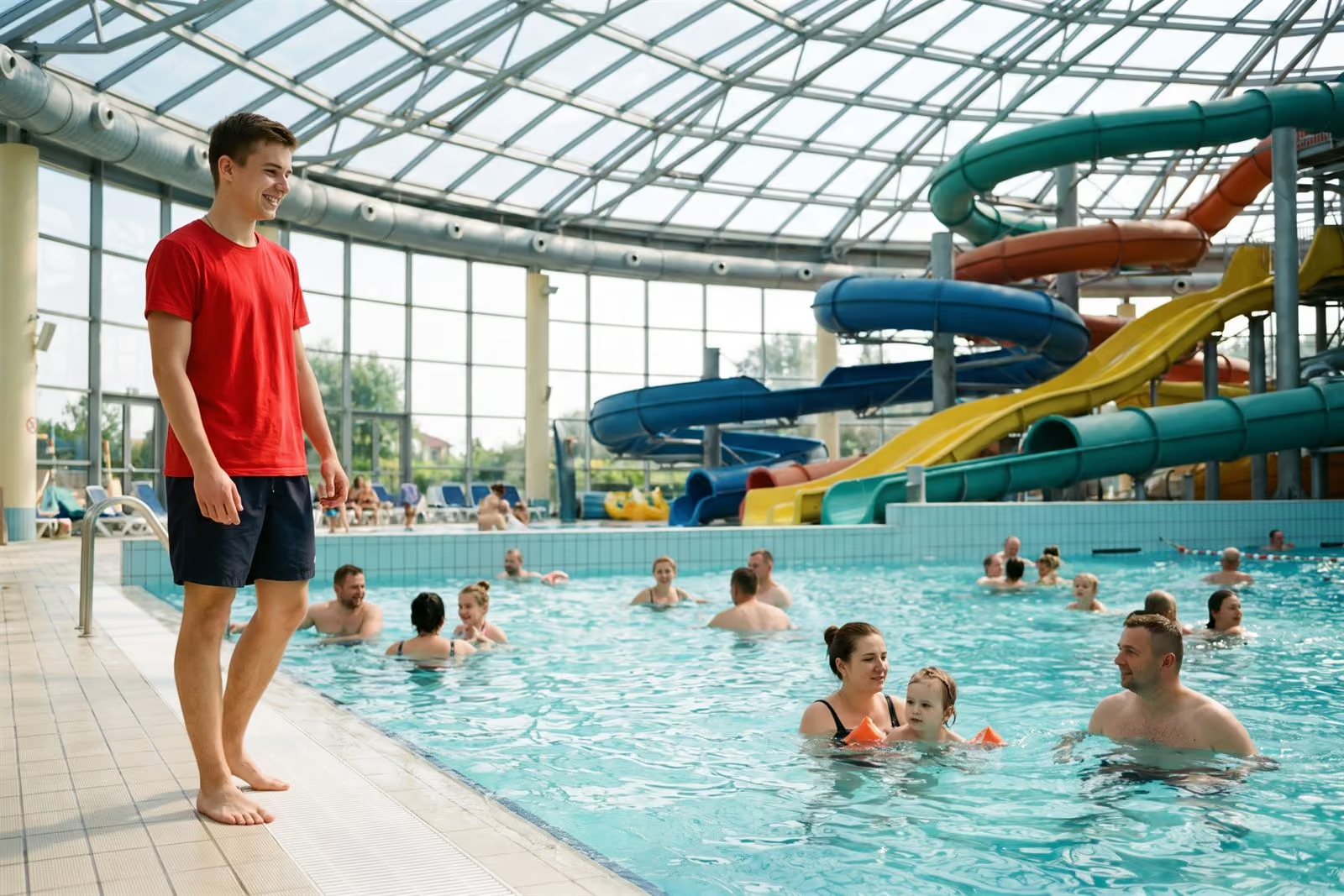
A lifeguard in a red shirt by the pool of a water park, slides behind

A venue's year: school breaks, summer and weekends change staffing; the zone minimum stays. Illustration.

21 days, no card with account manager Start: zone schedule. Premium: automation from $3.50 per employeePricing

This is how venue directors describe the season before we talk.

  1. 1

    “From month to month, staffing changes by dozens of people, and visitor numbers depend on weather and weekends.”

  2. 2

    “The schedule is made every week from availability that zone managers collect from messages.”

  3. 3

    “Every zone must have its required staffing, however many people come.”

This is the problem leisure and entertainment venues usually bring to us.

The minimum number of lifeguards in a zone is set by regulations, not visitor numbers. Proplanum keeps it staffed and visible. The rest follows visitors: tills, food service, entertainment and rentals.

One venue.

The shift manager builds the zone schedule on the phone, availability and swaps go through the app, hours go to the accountant. No venue comparison.

Season and teamFor a single venue

Several venues or a group.

Zones, roles and staffing rules described once and copied to the next venue; planned and actual hours side by side.

ZonesFor several venues

The zone minimum comes from regulations, the rest from visitor numbers. zone schedule from Startautomation and visitor data from Premium

  • You set out shifts for each zone, from pool and slides to tills, food service and entertainment, even unassigned ones. Gaps show for the whole week before the team sees the schedule. A minimum staffing level per zone with an hour-by-hour gap report is from Premium.
  • Proplanum drafts the schedule from the required staffing and the team's availability; the manager corrects and publishes it. automation from Premium
  • Visitor numbers come from your ticketing or till system, through an integration built for your systems as part of implementation, or by file or by hand. from Premium
  • School groups and birthday parties at fixed times go into demand as fixed staffing for that hour.
  • Hourly forecast temperature can be an extra measure in your staffing rules, next to visitor numbers.
  • Without visitor data, the required staffing still builds the zone schedule.

Proplanum does not help you avoid the minimum. It helps you staff it and see it before Saturday.

Work schedule: four scheduling modes
Season staffing grows and shrinks by dozens of people, and the schedule is still ready a week ahead. fromStart

  • Recurring availability: someone with classes on fixed days enters it once; one-off for single days. Automatic scheduling from your staffing rules uses both (from Premium).
  • The manager posts an unassigned shift as an open shift and approves with one tap when a volunteer takes it. Before approval, Proplanum checks Labour Code rules and warns the manager.
  • The seasonal team list is uploaded once, with contract and rate in the employee record. The manager decides zone staffing.
  • Seasonal civil-law contracts (umowa zlecenie) and permanent staff count in the same venue records.
  • You change the number of accounts every month: up at any time, down from the next month.
  • Quiet hours at night and a reminder before each shift.

This is built for turnover, not for a stable team.

Leave requests, availability, swaps and open shifts
Saturday's schedule has shifts open for weather, and the same team takes them in the app when rain or sun comes. Illustration, not a screen.

Coming off a zone is a clock-out too, and the venue records it by itself. fromBiznes

  • A kiosk on a tablet in the staff changing room, or in the browser in the manager's office. Clocking in takes a second: PIN, QR code or proximity card. A lifeguard needs no phone.
  • Without internet access the kiosk accepts PIN and QR code clock-ins and sends them later. By an indoor pool this happens every day.
  • Plan and actual hours sit side by side the same day. An absence alert goes to the person you choose, and every correction stays in the history with its author.
  • Venue working time records print for an inspection, seasonal and permanent staff together.
  • Hours go to the HR and payroll system you use, or by file to your accounting office.

We count hours in the zones; we do not judge people. Nothing here compares employees with each other.

Time tracking and kioskWhat your venue team will see

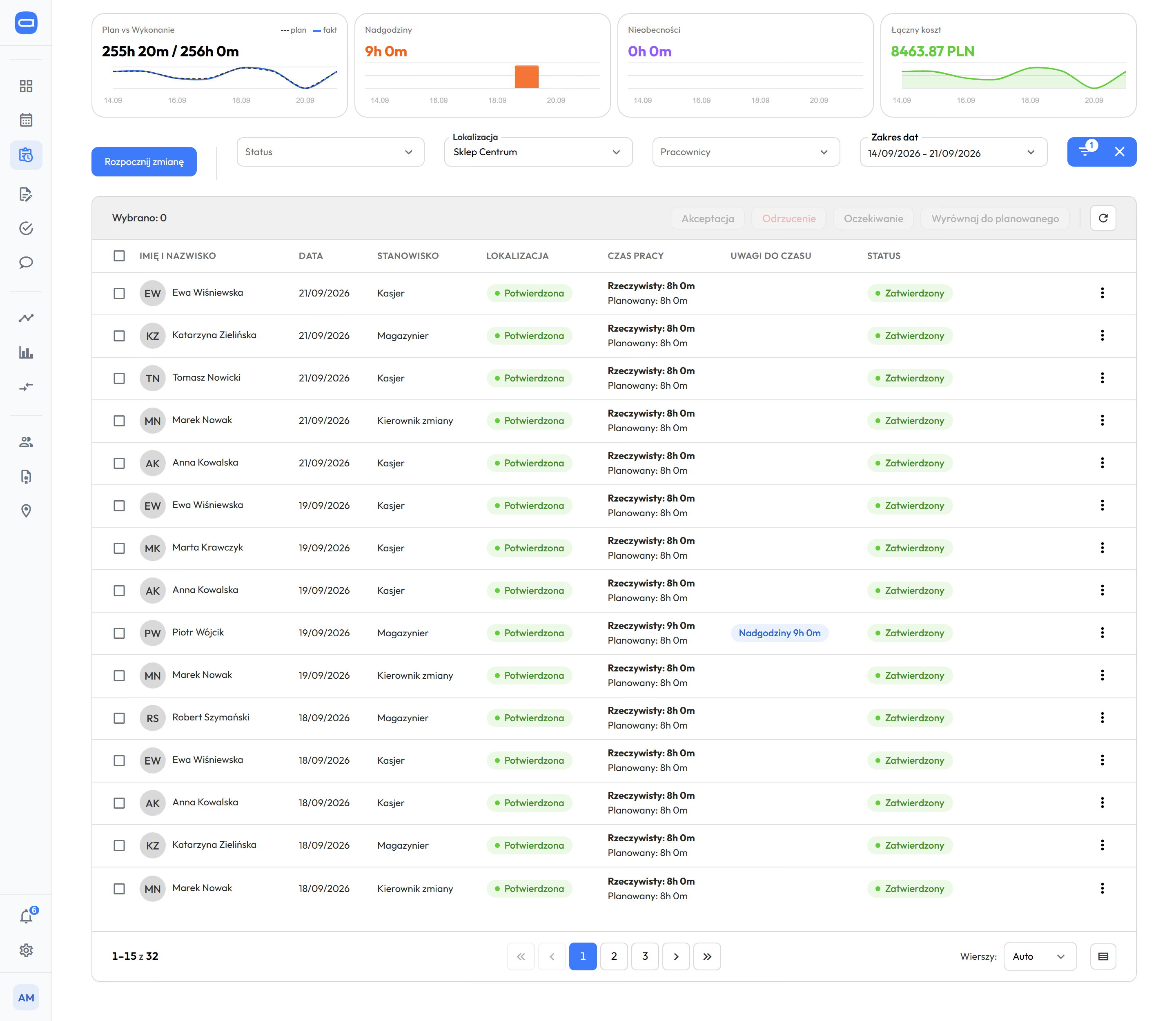
Time tracking in Proplanum, week of 14 to 21 September: tiles for plan and actuals, overtime, absences and total cost above the list, below them the first eight entries with date, position, confirmed location, actual time next to planned and an overtime note on one entry
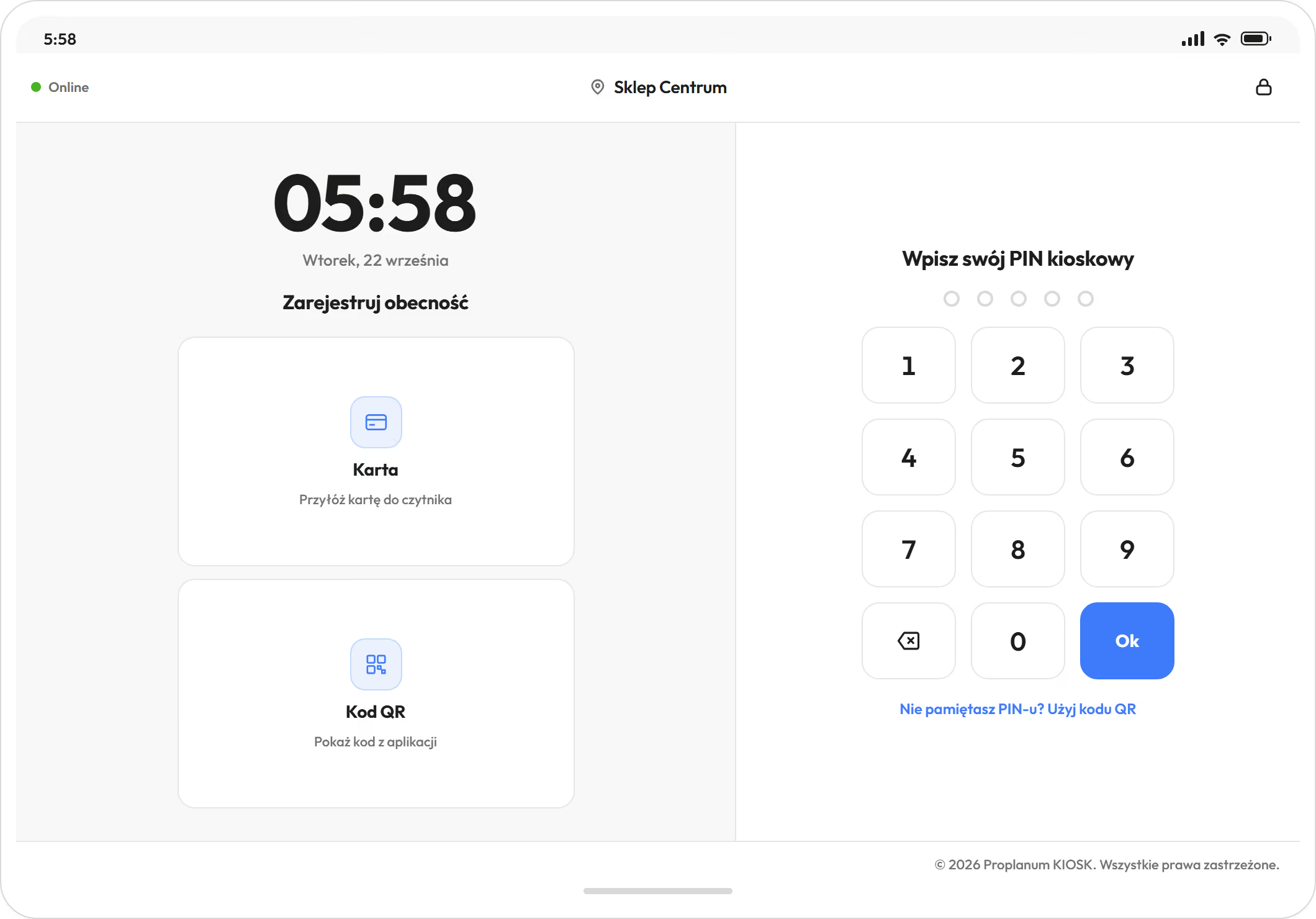
A tablet kiosk: clock, card or QR code clock-in and a PIN keypad
A tablet kiosk at the staff entrance, with a week of time entries next to the plan behind it. Demo data. The app is available in English.

One venue runs from the phone. With several, the same zone structure sits side by side. venue comparison from Premium

  • You describe zones, roles and staffing rules once and copy them to the next venue.
  • Planned and actual hours, overtime and cost per hour sit side by side during the season. from Premium
  • Someone working at two venues under one contract has shifts counted together under the Labour Code.
  • Time tracking and payroll close the season after the fact. Here zone staffing is built before the weekend, and settled hours then go to your system.

Already have time tracking? We do not come to replace it. We ask where zone staffing above the minimum comes from and who sees Saturday's gaps on Wednesday.

Location comparison and reportsIntegrations and security

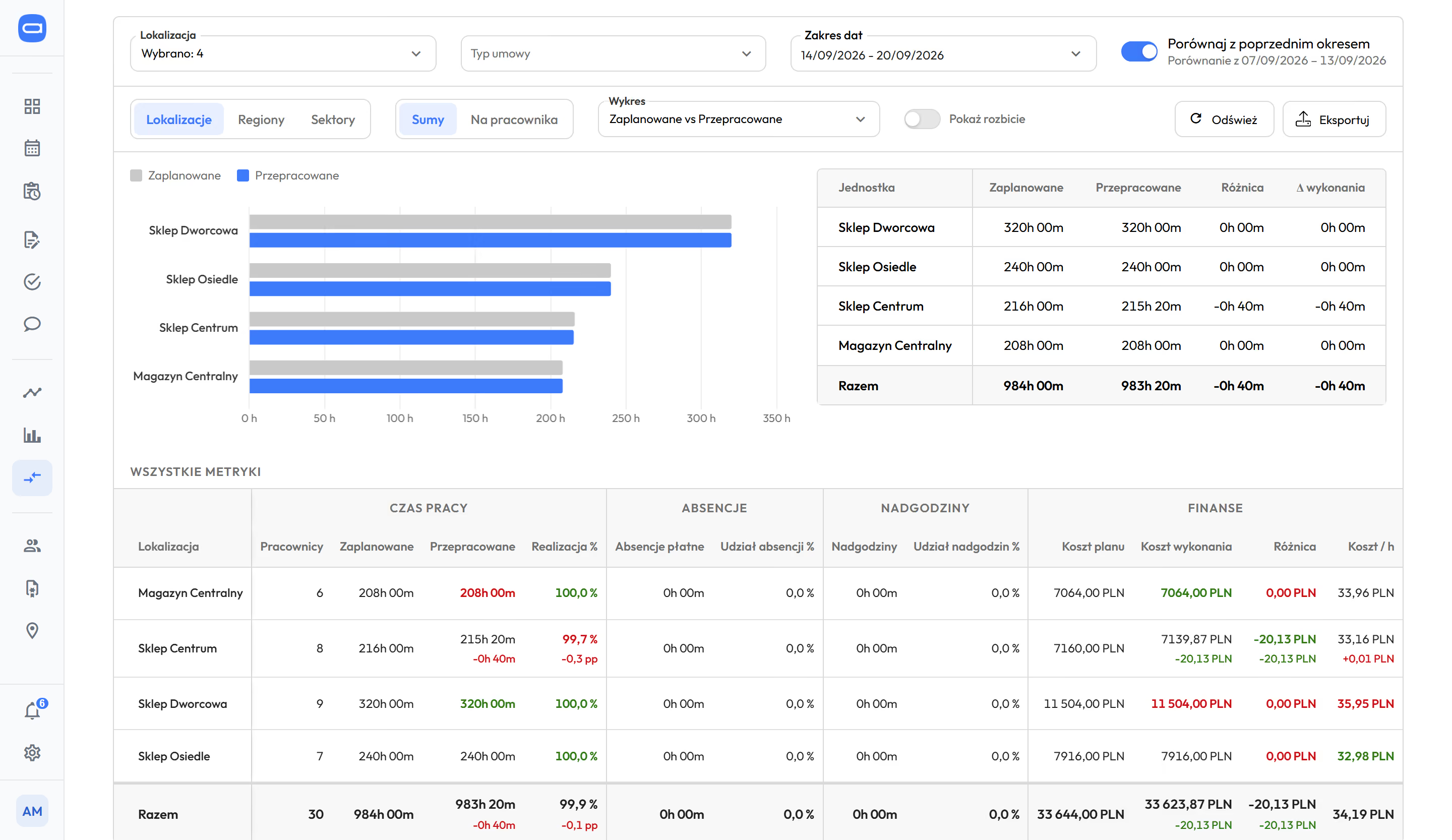
Location comparison in Proplanum: four locations side by side in a chart of planned and worked hours, below a table with working time, absences, overtime, planned and actual cost and cost per hour, with comparison to the previous period switched on
Venues side by side: planned and actual hours. Demo data. The app is available in English.

The operations director, HR director and zone manager work with the same hours.

A cashier hands a wristband to a family at the till of an entertainment venue, a queue behind
An employee watches the trampoline zone while children jump into a foam pit
A lifeguard in a red shirt by the pool of a water park, slides behind
Venue operations director

Sees Saturday's zone staffing gaps on Wednesday.

  • unassigned zone shifts visible a week before publishing
  • venues side by side: plan, actuals, cost per hour (from Premium)
  • visitor numbers from ticketing in staffing rules (from Premium)
Work schedule
HR director and HR

Get season records to print and export, and hours ready for payroll.

  • seasonal team uploaded by file, all contracts together
  • edit history; overtime 50% and 100%, nights, Sundays, public holidays
  • payroll export, electronic sick notes (e-ZLA) from ZUS, the Polish social insurance institution
Labour Code and working time
Zone manager and shift manager

Builds the schedule on the phone between rounds.

  • ready schedule to correct, published with a notification
  • swaps and open shifts approved with one tap
  • who is on shift now, next to the plan
Time tracking and kiosk

Your team gets the app: schedule on the phone, availability, swaps and requests without calling the manager. What your team will see

The employee file keeps lifeguard qualifications with expiry dates, and the schedule can refuse a lifeguard's shift without a valid qualification.

Zone schedules and availability in every plan. Changing-room clock-ins from Biznes, automation from Premium.

Three steps; each includes the one before.

Start

from $3.50

  • zone schedule on the phone, unassigned shifts too
  • availability, shift swaps and open shifts
  • Labour Code, contracts in the employee record
  • payroll export
here clock-ins become records

Biznes

from $4

  • changing-room kiosk and time tracking
  • records with approval of hours and alerts
  • Summaries with overtime 50% and 100%, plan vs actuals
  • tasks for a shift

Premium

from $4.50

  • automatic scheduling from your staffing rules and availability
  • visitor numbers from ticketing in staffing rules
  • venues side by side
  • team chat

Enterprise: group of venues, integrations with other systems, API, SLA, dedicated account manager. Quote after a call.Book a 30-minute call

Per employee per month, billed annually. Prices in US dollars (USD), excluding VAT. The employee file is an add-on to every plan at $0.50 a month per employee; once enabled, it covers all employees of the company.

Compare plans

The season changes the team list. Rules, clock-in methods and exports stay the same.

Time tracking and payroll close the season after the fact. Proplanum builds zone staffing before the weekend, shows hours during the season and hands the result to your systems.

  • 10 rulesof the Labour Code with your own thresholds, and a warning or block mode for the organisation.Product, September 2026.
  • 7 waysto track time: phone, browser, browser kiosk and tablet kiosk with PIN, QR code, NFC or RFID card.Product, September 2026.
  • 9 systemsfor HR and payroll used in Poland, with import instructions; plus ADP and e-ZLA from ZUS.Product, September 2026.
  • Overtime lower by about a quarter in three months.Store chain. A retail result, not a leisure venue one.

Each number has a period and a customer type, never a name.

An employee watches the trampoline zone while children jump into a foam pit

Questions we hear before the season.

Yes. You set out each zone's shifts, even unassigned ones, and see gaps for the whole week before publishing. A minimum staffing level per zone with an hour-by-hour gap report is from Premium. The minimum required by regulations stays the minimum; the rest follows visitor numbers.

You upload the list once, with contract and rate in the employee record. Civil-law and employment contracts share one schedule and records, and season hours go to payroll without retyping.

Every account counts as one licence: employee, manager or administrator. You change the number monthly: up at any time, down from the next month. After the season you reduce it, so July's list does not run into November.

Yes. The team clocks in and out at the changing-room kiosk or in the app. Plan and actuals sit side by side the same day. Time tracking is from the Biznes plan.

We do not come to replace it. The question is where zone staffing above the minimum comes from and who sees Saturday's gaps on Wednesday. You can run the 21-day trial next to what you have.

Yes, in the employee file, an add-on to every plan at $0.50 a month per employee; once enabled, it covers all employees of the company. For each document type you set an expiry date and choose a warning or a block in the schedule for anyone whose qualification has expired or is missing. A reminder comes before the expiry date.

Yes. Zone schedules, availability, swaps and time tracking work without visitor data. Staffing to visitor numbers is an option for venues with a ticketing or till system.

With a self-service start, data transfer is part of implementation included in your plan. Import from several systems is quoted with implementation. Our tools make it quick and keep your work running. You choose the date.

Start costs $4 per employee per month, Biznes $4.50 and Premium $5, excluding VAT. Billed annually: $3.50, $4 and $4.50. For more than 200 employees we prepare a custom quote. The contract term is agreed individually, and you decide what happens to your data if you leave. We sign a data processing agreement (DPA) with every customer.

A 21-day trial at one venue, no card and no commitment.

  1. Sign-up takes a few minutes.After a short call we activate your account for 21 days.
  2. Seasonal team list.By file or by hand, with all contract types.
  3. First week of zones with an account manager.Remotely, at your pace.
Start a 21-day trial

zone schedule from Start, automation from PremiumPricing

Next season's staffing is planned in autumn and winter, so a call off-peak is easier for both sides.

A remote start with an account manager and online training is included in the plan price. On-site days and on-site training are quoted separately, with the price agreed before the start. The ticketing system integration is built for your systems as part of implementation. With a self-service start, data transfer is included in implementation; import from several systems is quoted with it.

Several venues or 100 people a season? Book a 30-minute call.

rozrywka
Enter the name of the person we should speak to.
Enter the email address we should reply to.
Enter the number we should call you back on.
Choose a range so we can pick an example of a similar size.

Monday to Friday, 8:00 to 16:00, Central European Time (CET), we reply the same day. After 16:00 and at weekends, we reply by 12:00 on the next working day.

By sending the form, you agree that we may contact you about the call. Privacy Policy.

Thank you, we have your details.

We will call you back on the number you gave. Monday to Friday, 8:00 to 16:00, Central European Time (CET), we reply the same day. After 16:00 and at weekends, we reply by 12:00 on the next working day.

The form could not be sent. Please try again or call us on +48 503 700 111.

+48 503 700 111info@proplanum.com

Already using the app? Log in or visit the help centre in English.