
Demand forecast, demand-based scheduling and labour cost for multi-location businesses.
First you know how many people you need, hour by hour. Then the schedule is built to that number.
forecast and automatic from Premium
Proplanum is software for planning staffing and settling working time in shift-based businesses. Footfall and sales from recent weeks become a forecast. The forecast becomes the number of people for each hour. The schedule is built to that number, within contracted hours and the Labour Code. Then the plan sits next to actual in every location.
For chains with many regions and their own IT team, this is workforce management software, alongside your HR and payroll system.
On the call we compare staffing and demand using your numbers.
Prices in US dollars (USD), excluding VAT.
The forecast comes from data you already have: from your tills, your hotel system or a file. fromPremium
No new measurements needed. Footfall or sales that your tills count anyway are enough.
- 1
Data. Number of customers, sales or transactions, with an hourly profile. It comes in automatically from a till, POS or hotel system, by file import or by hand. We build the till integration for your systems as part of implementation.
- 2
Forecast. Built from 16 weeks of history, with trend, year-on-year comparison and its own error measurement. Each past week changes the forecast for the next one.
- 3
Staffing rules. They turn the forecast into the number of people per shift. Linear: one person per set number of customers. Threshold-based: one more person once footfall passes a threshold. You set them in an hourly window, separately for each location and position. You set fixed staffing that does not depend on footfall as a demand template, and tasks from the task manager go into it as fixed staffing.
- 4
Weather. Hourly temperature from the weather forecast can also be a metric in the rules.
Proplanum measures its own forecast error for each metric, so you can see which location to trust less. The conclusion stays with you.
Data from tills, POS and hotel systemsFrom footfall to staffing: forecast, staffing rule, number of people needed and the schedule. A drawing, not a screen.
The same number of hours, spread differently: where the footfall is. fromPremium
Flat staffing puts as many people on at ten as at five in the afternoon. Staffing to footfall puts fewer on in the morning and more in the afternoon. The same hours, a shorter queue.
- Each person's FTE, contract and availability.
- Approved leave and electronic sick notes (e-ZLA) from ZUS, the Polish social insurance institution.
- Labour Code rules checked before publishing. You choose whether a breach gives a warning or blocks saving.
- You then see staffing against demand in the schedule, hour by hour.
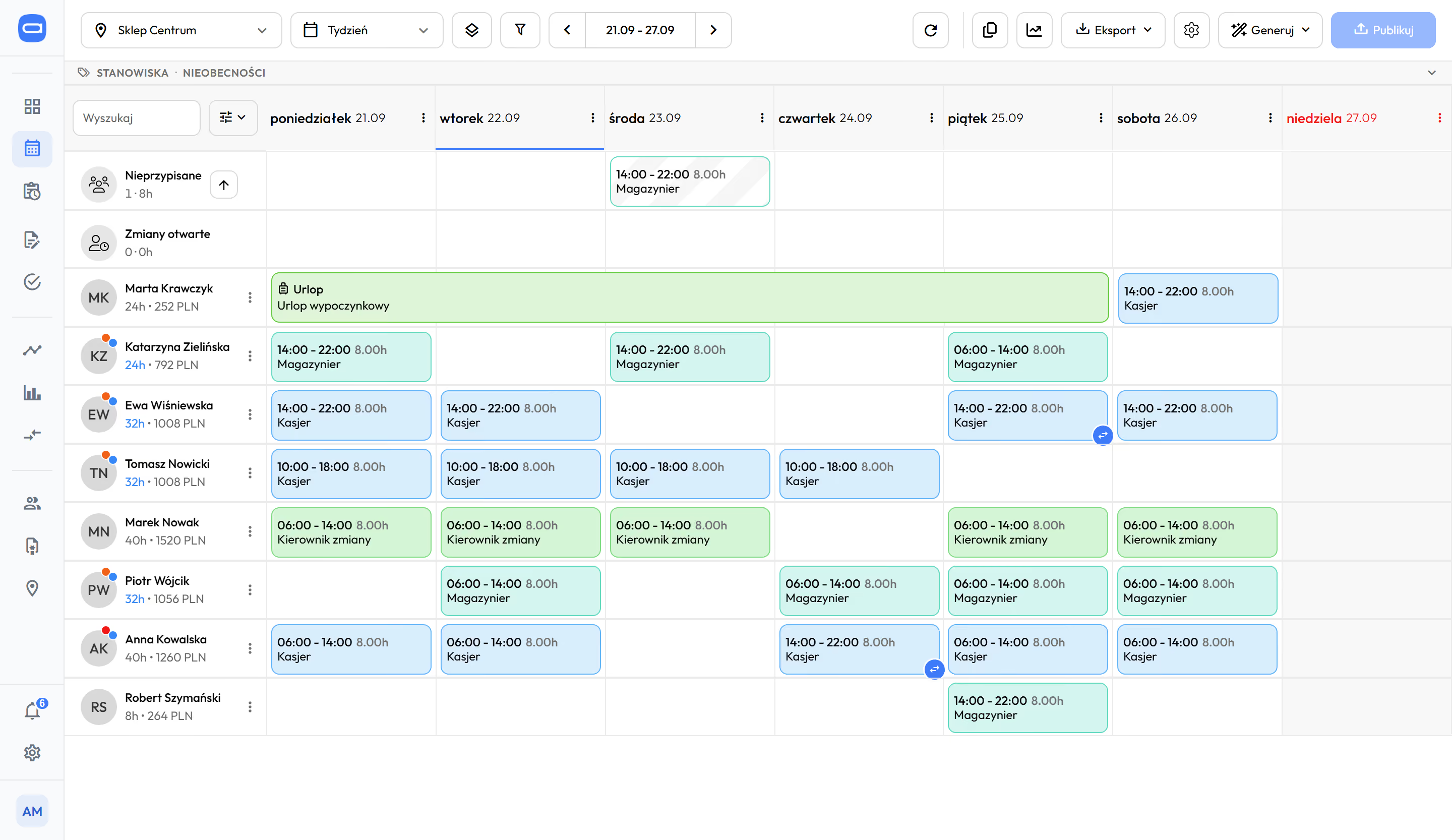
Weekly schedule after publishing: shifts with hours and the cost next to each name. Demo data. The app is available in English.
- While you schedule.
The daily and weekly hour limits are among the rules checked before publishing. The message appears next to the shift before you publish the schedule.
- During the period.
You see the balance of the reference period (the period over which working time is settled) as you go. In Summaries you can count overtime from the schedule alone, not only from hours worked.
- By company settings.
You set thresholds per person and per working time system, and the moment overtime is counted separately for each location.
Proplanum prepares a ready schedule, and the manager corrects and approves it. fromPremium
It does not replace the manager. It takes over the scheduling work. Their rules are saved, Proplanum prepares a version, and they correct it.
- 1 Staffing rules. How many people per shift, who works in which position, availability, contracts and FTE.
- 2 A ready schedule in one of four modes. From templates From unassigned shifts Crew rotation From demand
- 3 The manager sets what matters most. Order of goals: people's availability, cost, even hours, proportional distribution, rotation. Limits: maximum days worked in a row and a break after a night shift. The manager corrects the result by hand.
- 4 Publishing with a notification to the team. Nothing reaches the team until the manager approves it. An unassigned shift goes to the Unassigned row, the manager moves it to open shifts, and someone who wants it takes it.
When someone is ill or gets time off, you generate the schedule again, and the shifts you have already set stay in place. The manager always makes the decision.
Period templates and copying week to week, also for crews, are in every plan. from Start
How a ready schedule is builtDemo data. The app is available in English. A ready week after publishing, with one shift in the Unassigned row.
Crew rotation: fixed crews that change in a cycle, with a regular pattern of days off. Production and warehouses have separate views for planning crews.
Crew schedules in production and warehousesFour automatic modes. Each ends with a version to approve.
You choose the mode for each location. Proplanum takes leave, availability and Labour Code rules into account.
Templates
Proplanum shares out the shifts from a saved template among people.
For locations with a repeating week.
Unassigned shifts
Proplanum assigns shifts set up without names to available people.
When you know which shifts you need, but not who will take them.
Crew rotation
Crews enter a fixed shift cycle in the pattern you choose. After generating, you get a report of the Labour Code checks.
For production, warehouses and continuous operation.
From demand
Shifts are created to match the number of people from the forecast and staffing rules. A coverage report shows the hours that could not be staffed.
When you have footfall or sales data.
All four modes are in plans from Premium, together with automatic crew planning.
Proplanum publishes nothing by itself. The manager corrects and approves the version.
Plan next to actual and cost per hour during the month, not after it closes.
The view has three levels. Each plan gives you one of them; the forecast and automatic modes above are part of Premium.
Schedule statistics
from Start
Staffing hour by hour, hours and cost for each person, a counter of working Saturdays and Sundays. The manager sees the cost of a shift before approving it.
Summaries and plan next to actual
from Biznes
Overview, hours summary, overtime, financial summary and leave balance. A source switch: working time records or the schedule. The amount to pay next to each person.
Location comparison
from Premium
Locations, regions or sectors side by side: plan, actual, overtime, cost per hour. Comparison with the previous period.
The manager dashboard collects what needs attention today: requests, unassigned shifts, entries to approve. Working time alerts about lateness, early departure and absence go to the person who builds the schedule or to all managers of the location (from Biznes).
Location comparison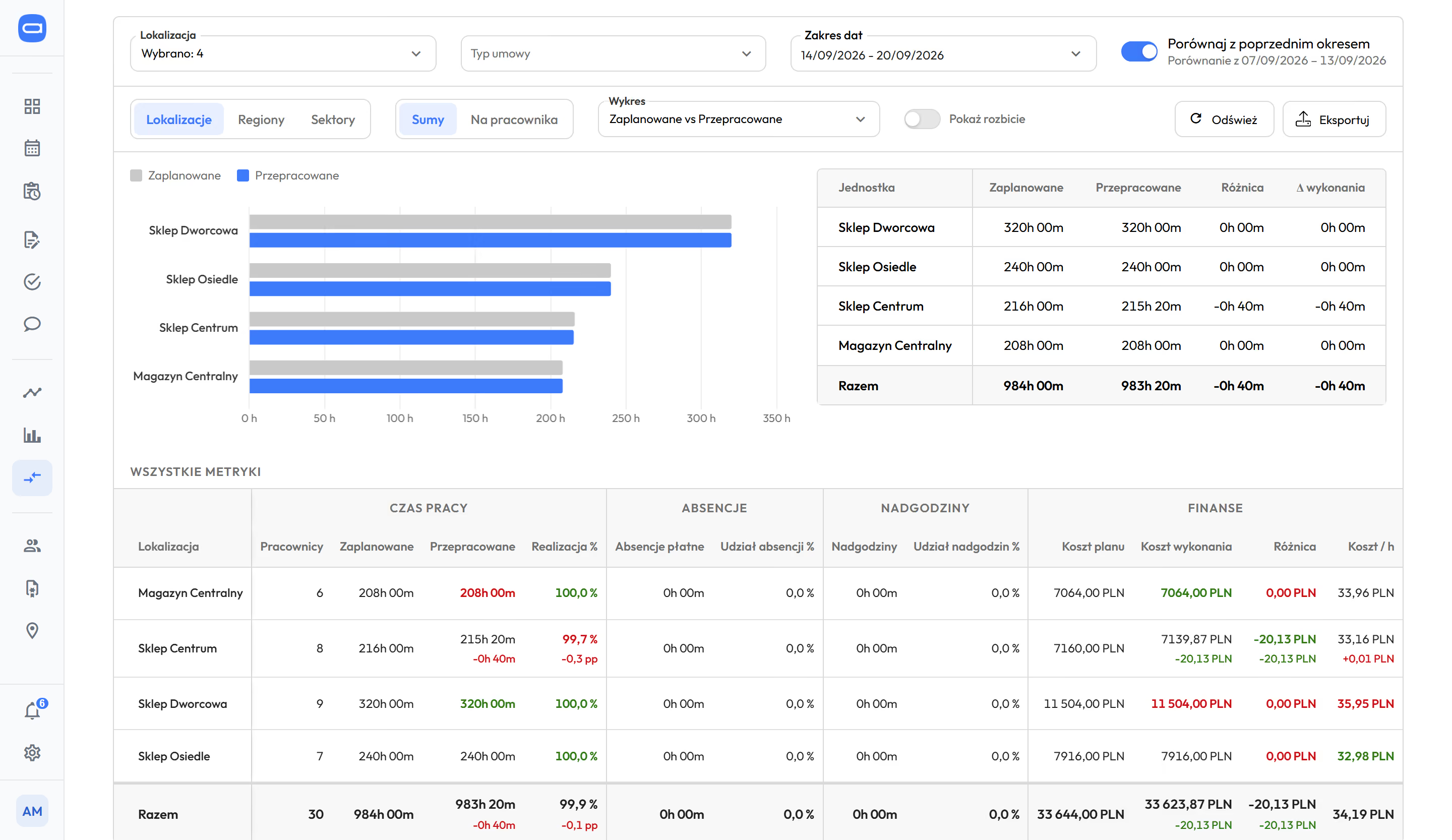
Locations side by side: planned and actual hours, cost per hour. Demo data. The app is available in English.
Hours from this month shape the next one.
In the HR and payroll system the month ends with payroll. In Proplanum the next schedule starts from it.
- 1
The forecast for next week is calculated from the footfall of the week that has just passed.
- 2
Plan next to actual shows where the schedule drifted from reality, before you build the next one.
- 3
Automatic scheduling from your staffing rules takes hours worked in the period and absences into account in the next round.
What goes back into the plan
| What goes back into the plan | How | Plan | Automatic or by decision |
|---|---|---|---|
| Footfall and sales from recent weeks | the forecast uses a rolling history, so each past week changes the forecast for the next one | from Premium | automatic |
| Forecast accuracy | Proplanum measures and shows its own forecast error | from Premium | measured automatically, the conclusion is yours |
| Plan next to actual | the period schedule and Summaries show where the plan drifted from hours worked | from Biznes | the view is automatic, the manager adjusts the rules |
| Hours worked in the period | automatic scheduling from your staffing rules plans the next weeks within the hours left in the reference period | from Premium | automatic |
| A layout that worked | a period template saved once and loaded in the next period, also for crews | from Start | when you choose |
| Leave, sick notes, availability | go into the next round of scheduling | from Start | automatic |
| Location comparison | cost per hour and plan completion show where staffing rules are too generous or too tight | from Premium | the view is automatic, the decision is yours |
Proplanum does not change staffing rules by itself. It shows where the plan drifted from actual, and the manager makes the decision.
The result is ready for your HR and payroll system.
We do not replace your HR and payroll system. We plan the hours earlier and hand it a ready result.
Hours and absences go to nine HR and payroll systems used in Poland, with import instructions. Plus two-way ADP and e-ZLA from ZUS.
nine systems












- APIEnterprise
Moving from another system? With a self-service start, data transfer is part of the implementation included in your plan. Import from several systems is quoted with implementation. You choose the date.
Integrations, security and APIQuestions people ask before a call about demand-based staffing.
We have no till data in a system. Does that rule us out?
No. Footfall data also comes in by file import or by hand, and we build the till integration for your systems as part of implementation. Without footfall data, scheduling and automatic scheduling work from your staffing rules, and plan next to actual and location comparison are calculated from hours.
How does Proplanum know how many people you need at five in the afternoon?
From the forecast and the staffing rules. The forecast is built from 16 weeks of history, with trend and year-on-year comparison. A rule turns it into a number of people: one person per set number of customers, or one more person once a threshold is passed. You set the rules yourself, separately for each location and position.
Will Proplanum change the staffing rules by itself when it sees the plan does not match?
No. It shows where the plan drifted from actual and where cost per hour stands out. The manager or director corrects the staffing rules. The forecast, on the other hand, updates itself with each past week.
We run a hotel, not a store. Where will you get the demand from?
From your hotel system: occupancy, arrivals, departures and meals go into planning automatically, and we build the integration for your system as part of implementation. You set staffing rules separately for reception, housekeeping and food and beverage.
Our manager has built the schedule for ten years. Why would they need a forecast?
The forecast does not replace the manager. It gives them a number for each hour before they start. Their rules are saved, Proplanum prepares a version, and they correct and approve it.
Will we see overtime only after the month closes?
No. Proplanum checks the daily and weekly hour limits while you build the schedule, before publishing. During the period you see the balance, and you can count overtime from the schedule alone. Labour Code rules are in every plan, Summaries from the Biznes plan.
What is in the Biznes plan, and what needs Premium?
The schedule, period templates, staffing and cost statistics and Labour Code rules are in every plan. Summaries and plan next to actual from Biznes. Forecast, staffing rules, automatic scheduling from those rules and location comparison from Premium. For more than 200 employees we prepare a custom quote.
We already have scheduling software. Can we test Proplanum alongside it?
Yes. A 21-day trial, or a pilot in one location or region alongside your current system. You switch over when you decide. With a self-service start, data transfer is part of the implementation included in your plan. Import from several systems is quoted with implementation.
The call takes 30 minutes and ends with a first step based on your numbers.
- Scale and data.How many locations, where your footfall or sales data comes from, who builds the schedule today.
- Staffing and footfall on your numbers.How many paid hours match demand, using one location as an example.
- What implementation means on your side.Till integration, a regional pilot, the price agreed before the start.
With a self-service start, remote configuration with your account manager and online training are included in the plan price. We quote implementation with an integration built for your systems, on-site days with your account manager or on-site training separately, with the price agreed before the start.
- over 8,000 employees at our largest customer
- data stored in Microsoft Azure in the EU
- DPA with every customer, SLA in Enterprise
Book a 30-minute callStart a 21-day trial
forecast and automatic schedules from PremiumPricing
A dozen locations or more? Book a 30-minute call.
Thank you, we have your details.
We will call you back on the number you gave. Monday to Friday, 8:00 to 16:00, Central European Time (CET), we reply the same day. After 16:00 and at weekends, we reply by 12:00 on the next working day.