Department staffing against occupancy: one property or a hotel group.

Tomorrow's occupancy is in the hotel system. Staffing for each department is built from that number, not alongside it.

Proplanum takes occupancy, arrivals, meals and rooms to clean from your hotel system and turns them into the number of people in each department. We set the conversion rules with the department manager, not for them. Reception, housekeeping, food service, spa and maintenance sit side by side in one plan before the month closes.

On the call we compare staffing and occupancy on your numbers, for one department and one day.

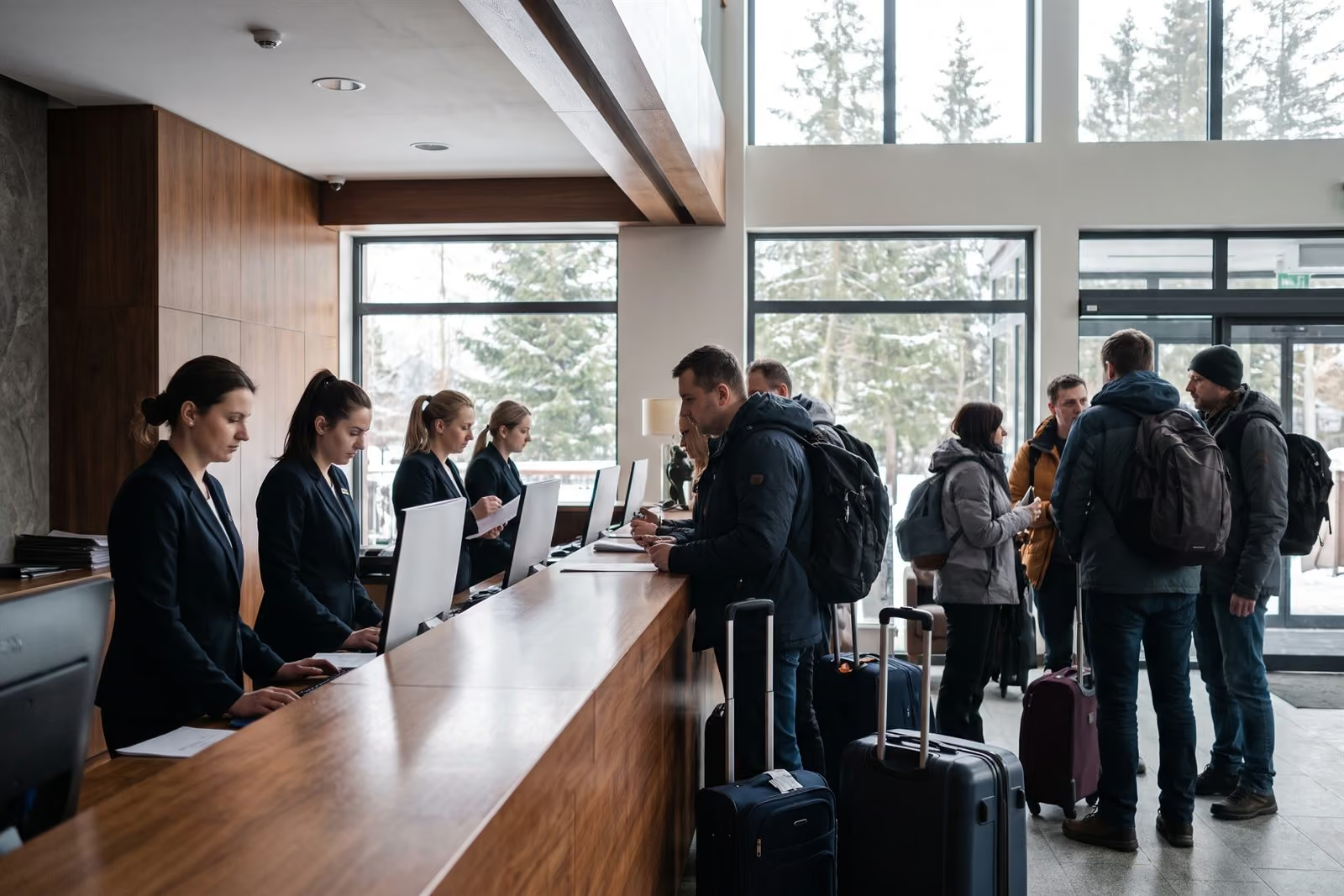
The long front desk of a large hotel, four receptionists check in guests with suitcases

One occupancy, different staffing per department; the Labour Code counts each person's day across departments. Illustration.

21 days, no card with account manager Start: schedule. Premium: occupancy staffing from $3.50 per employeePricing

This is how hotel directors describe their schedule before we talk.

  1. 1

    I know next week's occupancy from bookings, but the housekeeping schedule is made without that number.

  2. 2

    I know tomorrow's breakfast count, but I made the kitchen schedule two weeks ago.

  3. 3

    Each department plans in its own spreadsheet. I have no single place to see how many people work tomorrow across the hotel.

These are the problems we hear about before implementation.

In a hotel, demand is known in advance and in numbers, because it sits in the hotel system. Each department peaks at a different time of day, and a wedding or a coach party changes everything in one day. This page is written for that rhythm.

One property.

A leisure, conference or spa hotel with a dozen or several dozen departments in one building. The approach fits as it is.

Occupancy in the schedule

A hotel group.

A shared structure with rules for each department, all properties side by side in one view. The first step is a pilot in one property, run as a project, not an account trial.

For hotel groups

A small hotel with one person per position? Then staffing to occupancy does not apply. You get the schedule on the phone, swaps and actual hours. For a single property

Occupancy from the hotel system becomes department staffing, using the manager's rules. fromPremium

The hotel schedule is built from occupancy, not alongside it. Publishing, swaps and actual hours work without any occupancy data.

  • Occupancy, arrivals, departures, meals and rooms to clean come from the hotel system, through an integration built for your systems as part of implementation, or by file.
  • Rules that convert these into people are set for each department and position, linearly or in steps. Reception counts arrivals, housekeeping rooms to clean, food service breakfasts and dinners.
  • We set the rules with the department manager, not for them. Proplanum drafts the schedule; the manager corrects and publishes it.
  • If you plan beyond your bookings, you get a forecast from the property's history.
How scheduling works

Occupancy and metrics from the hotel system reach planning three times a day.

Large mountain hotel, in live use.
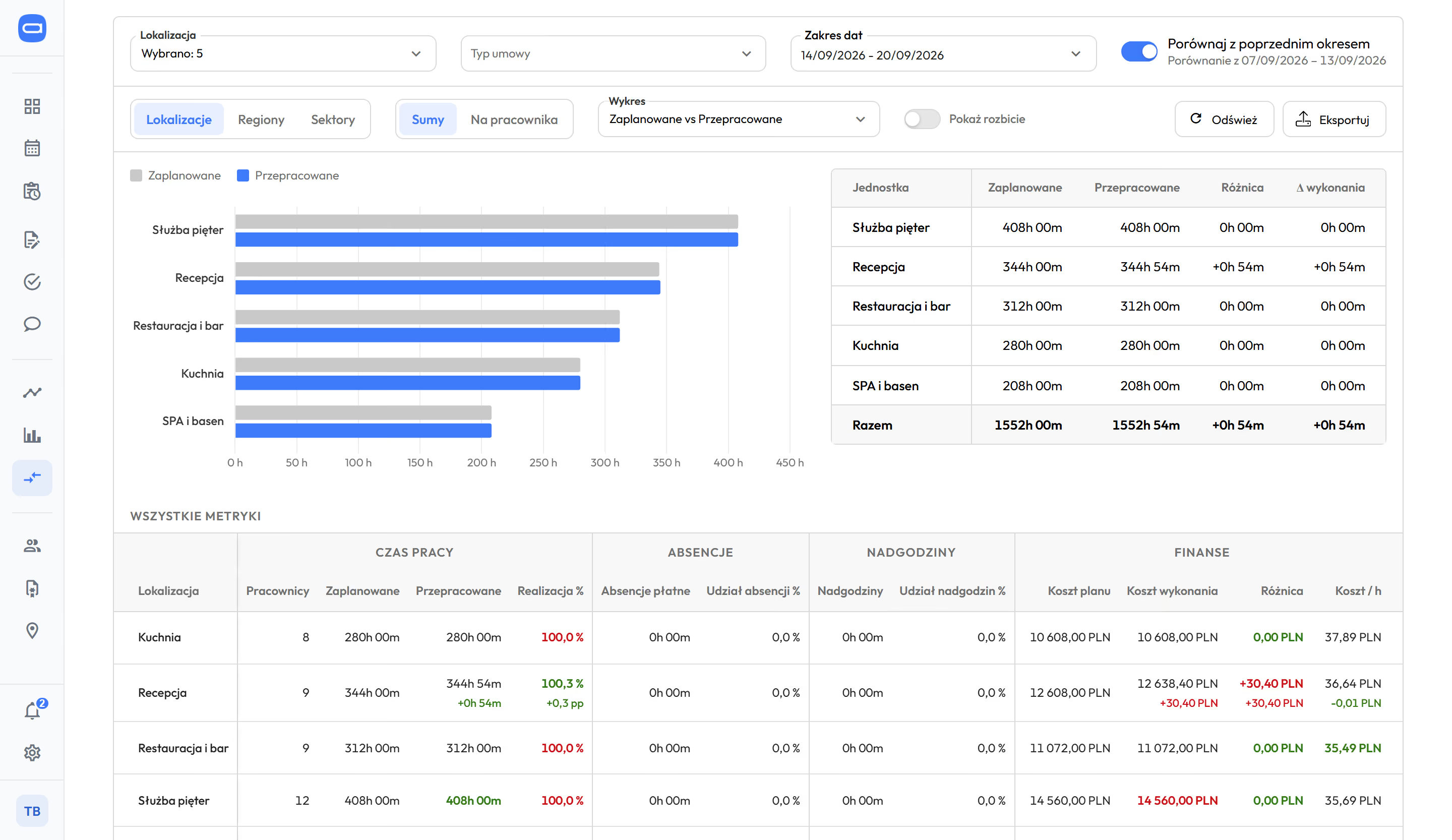
Reception, housekeeping, food service, spa and maintenance side by side: plan, hours, overtime and cost per hour. fromPremium

  • Departments in rows. Columns: planned and worked hours, absences, overtime at 50% and 100%, planned and actual cost, cost per hour, during the month.
  • The director sees the whole property without asking managers. Department differences show in the week, not after payroll.
  • Department managers see their department, the director the property, group head office all properties in one view.
  • Several properties? The same rows for each one, side by side.
Department comparison and reports
Comparison of five hotel departments for the week of 14 to 20 September: housekeeping, reception, restaurant and bar, kitchen, and spa and pool, with planned and worked hours in a chart and a table and comparison to the previous week; below, all department metrics: people, plan completion, absences, overtime, planned and actual cost and cost per hour
Five hotel departments side by side: planned and actual hours, overtime, cost per hour, compared with the previous week. Demo data. The app is available in English.

Schedule, swaps and availability on the phone, instead of a printout and a call to the manager. fromStart

  • Employees see the published schedule and every change on their phone. A notification replaces the back-office printout.
  • A swap or a shift handed over goes through the app: another employee takes it, the manager approves with one tap. Before approval Proplanum checks the Labour Code rules and warns the manager.
  • When a group arrives at short notice, the manager posts the unassigned shift as an open shift, and people who can take it get a notification.
  • Time tracking (from Biznes): a kiosk on a tablet at the staff entrance and the app for departments on the move. Hours sit next to the plan the same day.
What your team will see
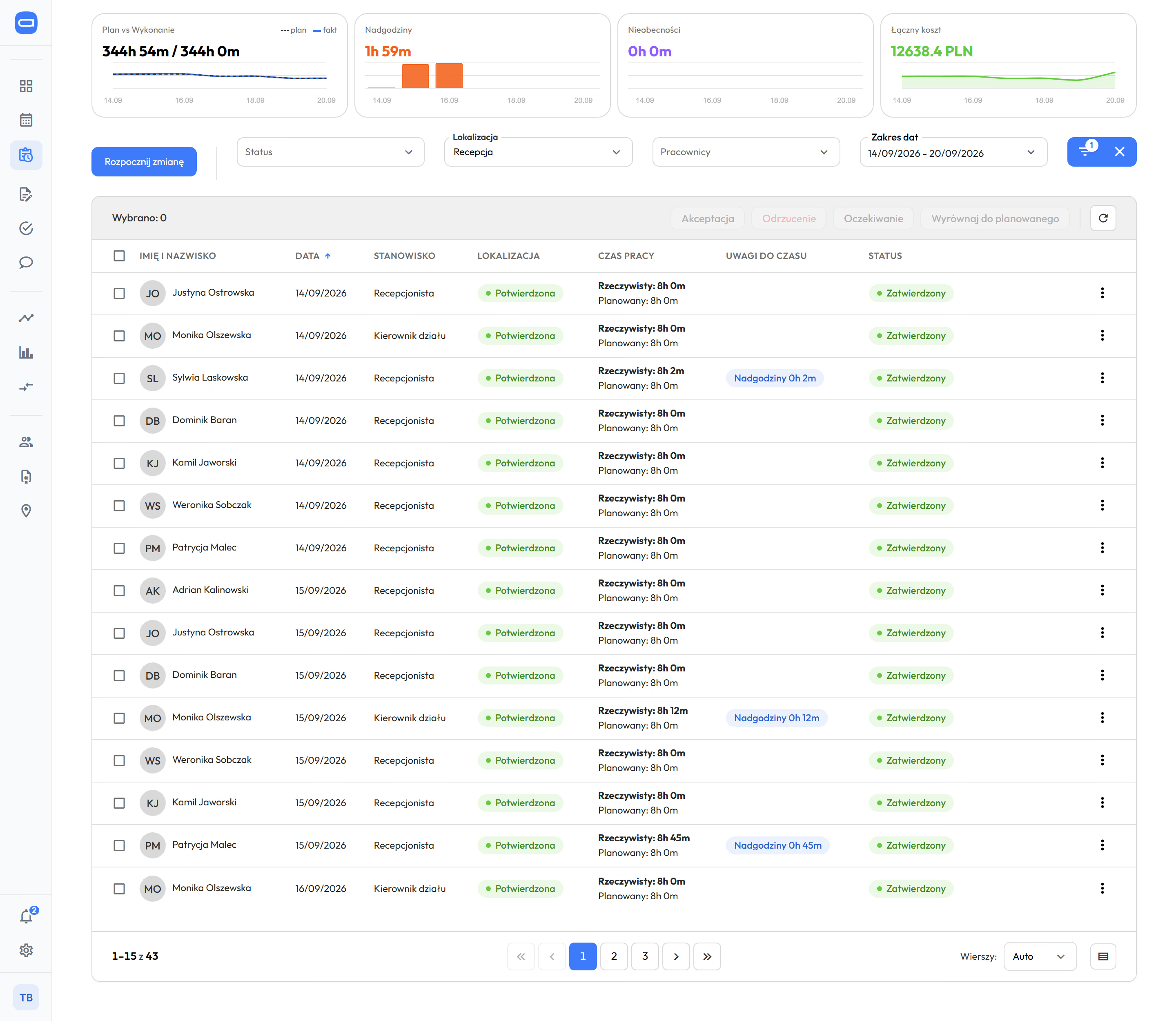
Time tracking for hotel reception, week of 14 to 20 September: tiles for plan and actuals, overtime, absences and total cost, below them the first eight entries with date, receptionist or department manager position, confirmed location, actual time next to planned time and an overtime note on two entries
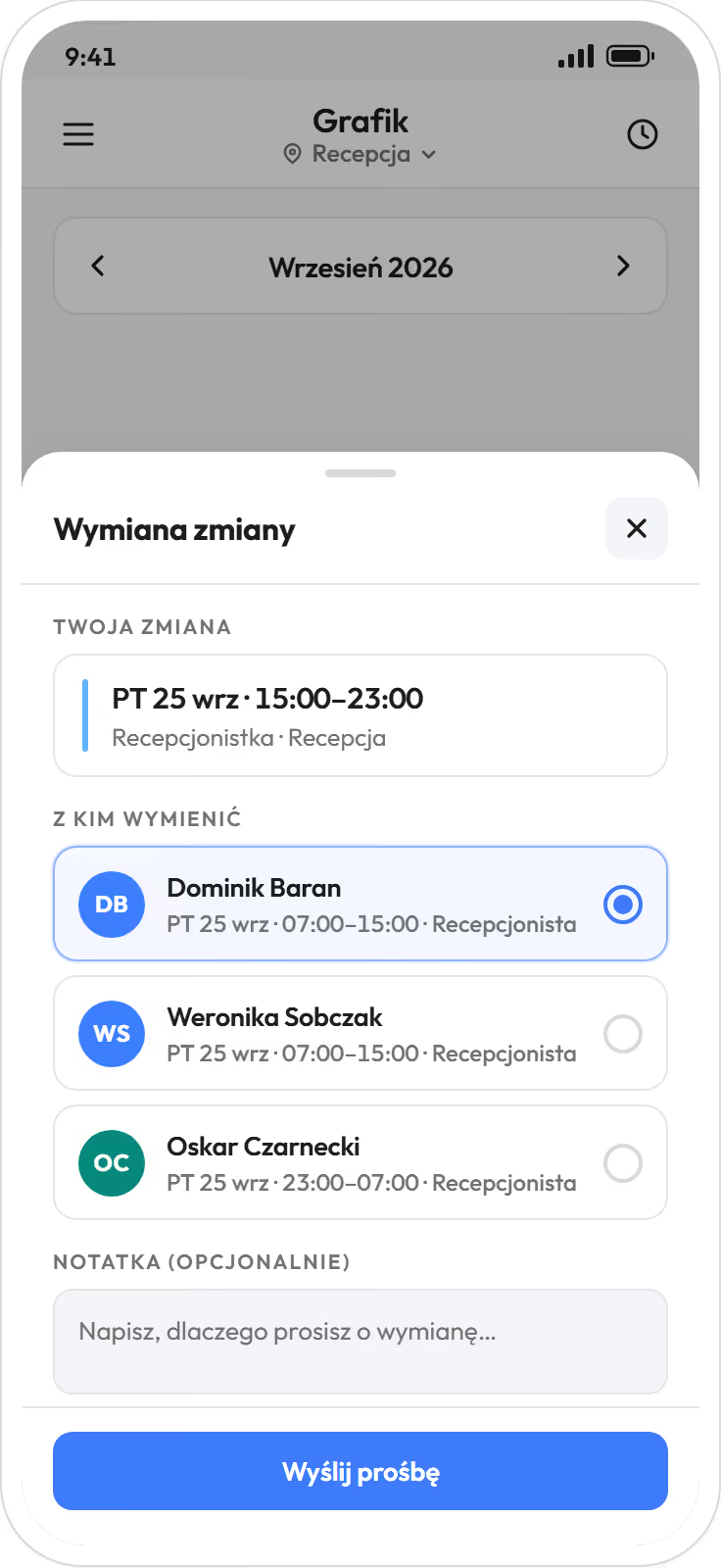
The reception employee app: a shift swap on Friday 25 September from 15:00 to 23:00, a choice of three receptionists working that day, one selected, a note field and a send button
A shift swap in a receptionist's app, with the department's time tracking behind it: actual hours next to planned, overtime on the same day's entry. Demo data. The app is available in English.

Rest periods, hour limits and Sundays checked before the schedule is published. fromStart, actuals from Biznes

  • A hotel works seven days a week, with 12-hour shifts in the equivalent working time system (longer shifts balanced by shorter days over the same reference period, the span over which hours are settled), nights, public holidays and seasonal staff. Labour Code rules with your own thresholds apply while you schedule; for the organisation you choose a warning or a block. With a block, only an administrator or HR can knowingly save a single shift, and Proplanum logs it.
  • Employment and civil-law contracts (umowa zlecenie) share one schedule, seasonal and permanent staff alike. Overtime 50% and 100%, nights, Sundays and public holidays come from time tracking (from Biznes).
  • Working time records with correction history print and export; hours, overtime and absences go to your HR and payroll system without retyping. An electronic sick note (e-ZLA) from ZUS, the Polish social insurance institution, takes the person off shifts and alerts the manager.

Labour Code and working time in the scheduleHow hours reach payroll

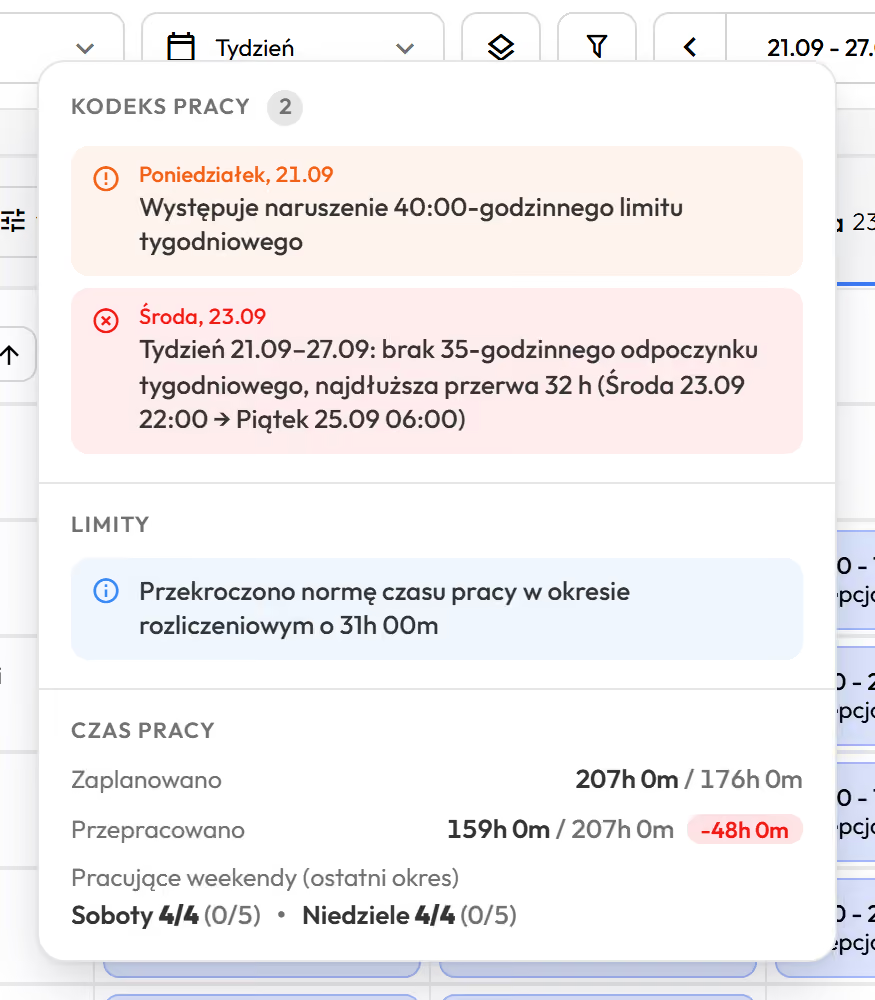
The Labour Code window open for a reception employee in the schedule for 21 to 27 September: a warning about exceeding the 40-hour weekly limit on Monday and a breach on Wednesday, no 35-hour weekly rest, longest break 24 hours from Wednesday 23:00 to Thursday 23:00; below, the exceeded standard in the reference period, planned and worked hours and Saturdays and Sundays worked
The Labour Code window in the reception schedule: missing 35 hours of weekly rest shows before the schedule is published. Demo data. The app is available in English.

The hotel director, group operations director and HR look at the same hours.

Two room attendants with linen trolleys in a bright corridor of a large hotel
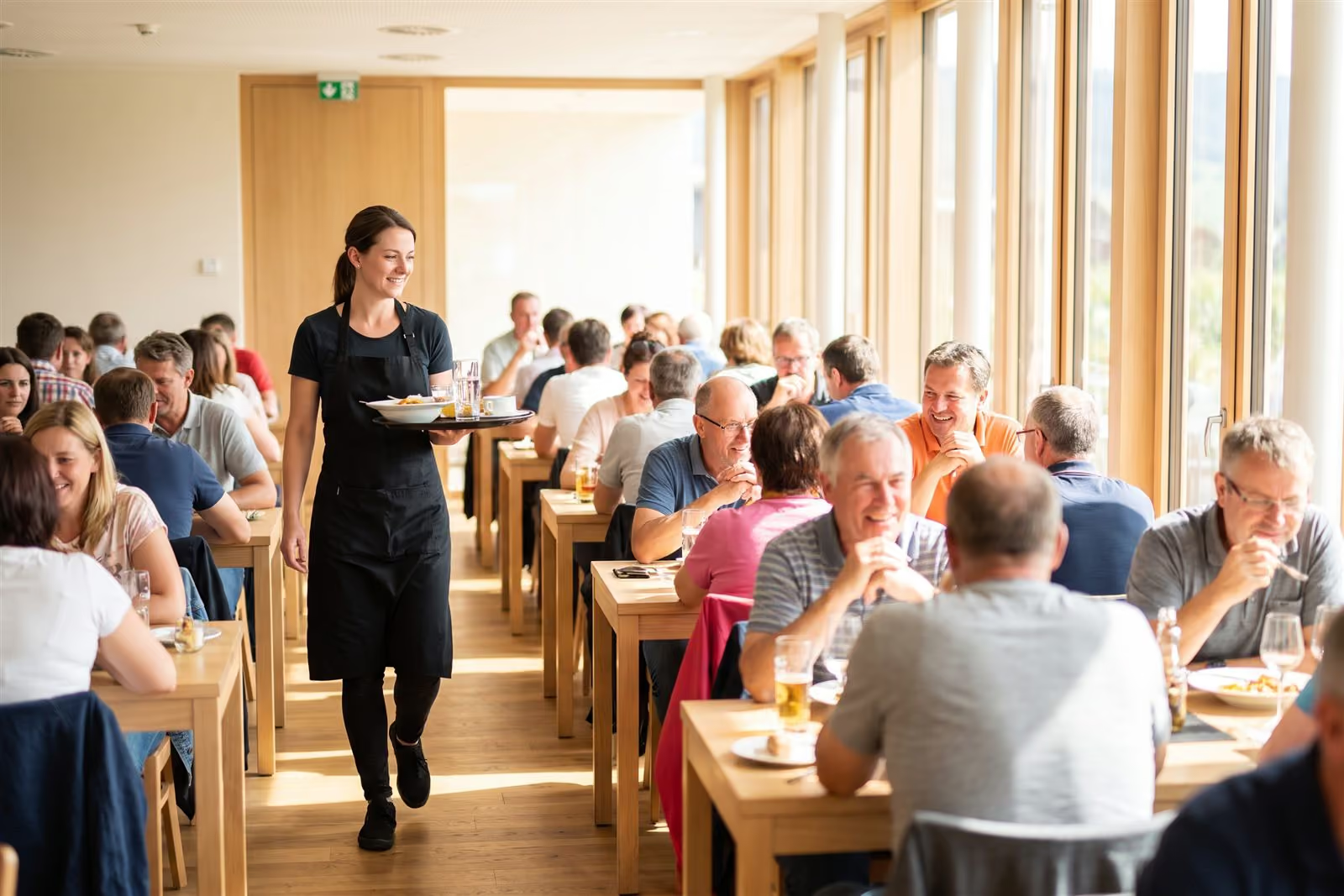
A waitress with a tray between busy tables in a full, bright restaurant
An HR officer at a desk with binders talks to an employee in a hi-vis vest in a bright office
Hotel director

Sees all departments side by side and how many people work tomorrow across the property.

  • staffing per department from occupancy
  • labour cost by department during the month
  • one view instead of a spreadsheet per department
Department comparison and reports
Group operations director

Compares two properties with similar occupancy and sees where the labour cost gap comes from.

  • shared structure, rules for each department in each property
  • properties side by side in one view
  • pilot in one property as a project, decision after a quarter
Pilot in one property
Hotel HR and payroll

Gets availability, leave and swaps in one place, and hours ready for payroll.

  • working time records, edit history, print, export
  • employment, civil-law and seasonal staff in one schedule
  • payroll export, e-ZLA sick notes from ZUS
Labour Code and working time

Department managers set their rules and publish the schedule; the team gets the app. What your team will see

The employee file keeps examinations and training for kitchen, reception and housekeeping with expiry dates, separately for each position.

Department schedules and hours for payroll are in every plan. Staffing to occupancy from Premium.

Three steps; each includes the one before.

Start

from $3.50

  • each department's schedule, published with notifications
  • Labour Code, equivalent system, nights, public holidays
  • leave requests, shift swaps and open shifts
  • payroll export

Biznes

from $4

  • kiosk at the staff entrance, time tracking on the phone
  • plan next to hours worked in each department
  • Summaries with overtime at 50% and 100%
  • tasks for a shift in the app
here: occupancy staffing

Premium

from $4.50

  • demand-based staffing from the hotel system
  • automatic scheduling from department staffing rules
  • departments and properties side by side
  • team chat

Enterprise: hotel group, integrations with other systems, API, SLA, dedicated account manager. Quote after a call.Book a 30-minute call

Per employee per month, billed annually. Prices in US dollars (USD), excluding VAT. The employee file is an add-on to every plan at $0.50 a month per employee; once enabled, it covers all employees of the company. Over 200 employees: custom quote.

Compare plans

Implementation goes department by department, up to the whole property.

A large mountain hotel plans the work of more than 400 people in 25 departments in one system. Retail figures come from another industry and are labelled as such.

  • more than 400 peoplein 25 departments in one system.Large mountain hotel, implementation 2026.
  • 10 rulesof the Labour Code with your own thresholds, and a warning or block mode for the organisation.Product, September 2026.
  • 9 systemsfor HR and payroll used in Poland, with import instructions; plus ADP and e-ZLA from ZUS.Product, September 2026.
  • about 9%lower labour cost with service levels maintained, in three months.Store chain. A retail result, not a hotel one.

Implementation in a property with many departments

  1. 1Structure and departments.
  2. 2One department first, with full staffing rules.
  3. 3Training for the people who plan each department.
  4. 4Hotel system integration and conversion rules agreed with each manager.

In a property with many departments, implementation takes months. A new department manager means agreeing its rules again, so we plan for it.

An implementation manager shows three employees in green aprons a kiosk tablet in a bright staff room

Questions we hear before implementation in a hotel.

The hotel system knows your guests; the HR and payroll system counts hours after the fact. We build staffing from occupancy before the shift, and when your team clocks in with Proplanum, we hand the result to your system. Bookings stay where they are.

Yes, so that occupancy, arrivals and meals come in automatically, through an integration built for your systems as part of implementation. Until then, data can be loaded by file or entered by hand.

Yes, and that is how we work. We agree the rules for turning occupancy into staffing with each department manager. The property still runs on one structure and one set of permissions.

With one person per shift, staffing to occupancy does not apply, and we say so. You get the schedule on the phone, swaps, availability and actual hours. When a group arrives at short notice, a volunteer takes the open shift and the manager approves.

They do not start from zero. Proplanum prepares the schedule from their rules; they correct and publish it. In a property with many departments we train the people who plan each one. To be fair: a new department manager means agreeing its rules again.

From a few days for one location to a few months for a property with many departments, depending on departments and integrations. On your side: structure, department rules and managers' time for training. A remote start with an account manager and online training is included in the plan price. On-site days and training are quoted separately, with the price agreed before the start. The hotel system integration is built for your systems as part of implementation.

Every account counts as one licence: employee, manager or administrator. You change the number of accounts monthly: up at any time, down from the next month. After the season you reduce it.

With a self-service start, data transfer is part of implementation included in your plan. Import from several systems is quoted with implementation. Our tools make it quick and keep your work running. You choose the date.

On the call we compare staffing and occupancy in one department, day by day.

  1. Departments and people.You tell us how the property works and where occupancy comes from.
  2. Staffing against occupancy in one department.We show one day, for example housekeeping after departures.
  3. What implementation means on your side.Scope, time and who is needed.

A remote start with an account manager and online training is included in the plan price. On-site days and training are quoted separately, with the price agreed before the start; with many departments this is the usual option. The hotel system integration is built for your systems as part of implementation. With a self-service start, data transfer is included in implementation; import from several systems is quoted with it.

A smaller property? Prefer to try it yourself? Start a 21-day trial, no card

Book a 30-minute call.

hotele
Enter the name of the person we should speak to.
Enter the email address we should reply to.
Enter the number we should call you back on.
Choose a range so we can pick an example of a similar size.

Monday to Friday, 8:00 to 16:00, Central European Time (CET), we reply the same day. After 16:00 and at weekends, we reply by 12:00 on the next working day.

By sending the form, you agree that we may contact you about the call. Privacy Policy.

Thank you, we have your details.

We will call you back on the number you gave. Monday to Friday, 8:00 to 16:00, Central European Time (CET), we reply the same day. After 16:00 and at weekends, we reply by 12:00 on the next working day.

The form could not be sent. Please try again or call us on +48 503 700 111.

+48 503 700 111info@proplanum.com

Already using the app? Log in or visit the help centre in English.